10 min read
12 Best Customer Support Tools in 2026

Hardik Makadia

Let’s build your chatbot today!
Launch a no-code WotNot agent and reclaim your hours.
*Takes you to quick 2-step signup.
Most support teams I’ve worked with don’t have a tooling problem. They have a stacking problem.
They’ve bought tools that overlap, left other gaps uncovered, and ended up with a fragmented operation where nobody can tell you which platform owns which part of the customer conversation. The budget gets spent, but somewhere between the helpdesk, the CRM, and the chat widget, context gets lost.
Agents copy-paste information between systems. Customers repeat the same issue across channels.
Trust me, this frustrates the customers the most.
The average support team now runs on more than six tools, and most of them don’t talk to each other cleanly. That gap, not the tools themselves, is where many support operations start to break down.
I’ve seen this pattern enough times to know: the problem usually isn’t what teams are buying. It’s that they’re buying overlapping tools while leaving other gaps untouched.
Before you scan the list below, four questions will tell you which category to prioritise first.
The 5 Categories of Customer Support Tools
Customer support software generally falls into a few core categories. Each solves a different operational problem inside a support team.
Category | Primary Job | When You Need It | Example Tools |
Helpdesk and Ticketing | Organise and track customer conversations as tickets | When support volume grows, and teams need structure, automation, and reporting | Zendesk, Freshdesk, Help Scout |
Live Chat and AI Automation | Handle real-time conversations and resolve repetitive queries automatically | When customers expect immediate responses and a large portion of tickets involve common questions | WotNot, Intercom |
CRM-Connected Support | Combine support conversations with full customer relationship data | When support teams need visibility into purchases, deals, and account history before responding | HubSpot Service Hub, Salesforce Service Cloud |
Industry-Specific Support | Provide support features tailored for specific business models | When your industry requires deep integrations with external systems like order management or inventory | Gorgias, Zoho Desk |
Knowledge Base and Self-Service | Help customers find answers without contacting an agent | When repeat questions could be documented and resolved before they become tickets | Help Scout Docs, Confluence |
Most modern platforms span more than one category. A helpdesk might include chat, AI automation services, and CRM integrations in the same product.
But understanding these categories helps you identify which capability your support operation needs first.
How to Pick the Right Customer Support Tool
Before evaluating AI customer support tools, you need to understand what your support operation actually needs right now.
Over time, I've found that four questions usually reveal where a team should start. These are the same questions I ask when a support leader tells me they're evaluating new tools.
1. How many agents do you have today?
Team size changes the type of tooling you need. Small teams can often run support from a shared inbox or a lightweight helpdesk. Others choose contact center outsourcing to scale support without growing headcount internally. Larger teams need structured ticketing with automation, routing rules, and reporting to stay organised.
If your team is growing beyond a few agents, prioritise a helpdesk or ticketing platform first.
2. What are your top three ticket types right now?
Look at what customers ask most: order status, password resets, product setup, refunds, and troubleshooting. When a large portion of tickets are repetitive, AI and automation can handle a meaningful share without involving an agent.
High volumes of repetitive questions usually mean AI chatbots or automation tools should be part of your stack.
3. How many channels are customers reaching you from?
Some teams handle support through email alone. Others manage conversations across live chat, social media, messaging apps, and phone. And as channels increase, it gets even harder to keep context across all of them.
If customers contact you on multiple channels, prioritise omnichannel platforms that unify conversations.
4. Do you already have a CRM your support team uses?
Support never just operates in isolation. Sales, marketing, and support often rely on the same customer data. When support tools don't connect to your CRM, agents lose context that's already been collected.
If your organisation runs a CRM, look for support tools with strong native integrations.
Top 11 Customer Support Tools in 2026
Each entry below follows the same structure: capabilities, trade-offs, and pricing that give you everything you need to make a confident shortlist decision without visiting a single vendor page. Let’s dive deeper into the top AI tools for customer support:
1. WotNot
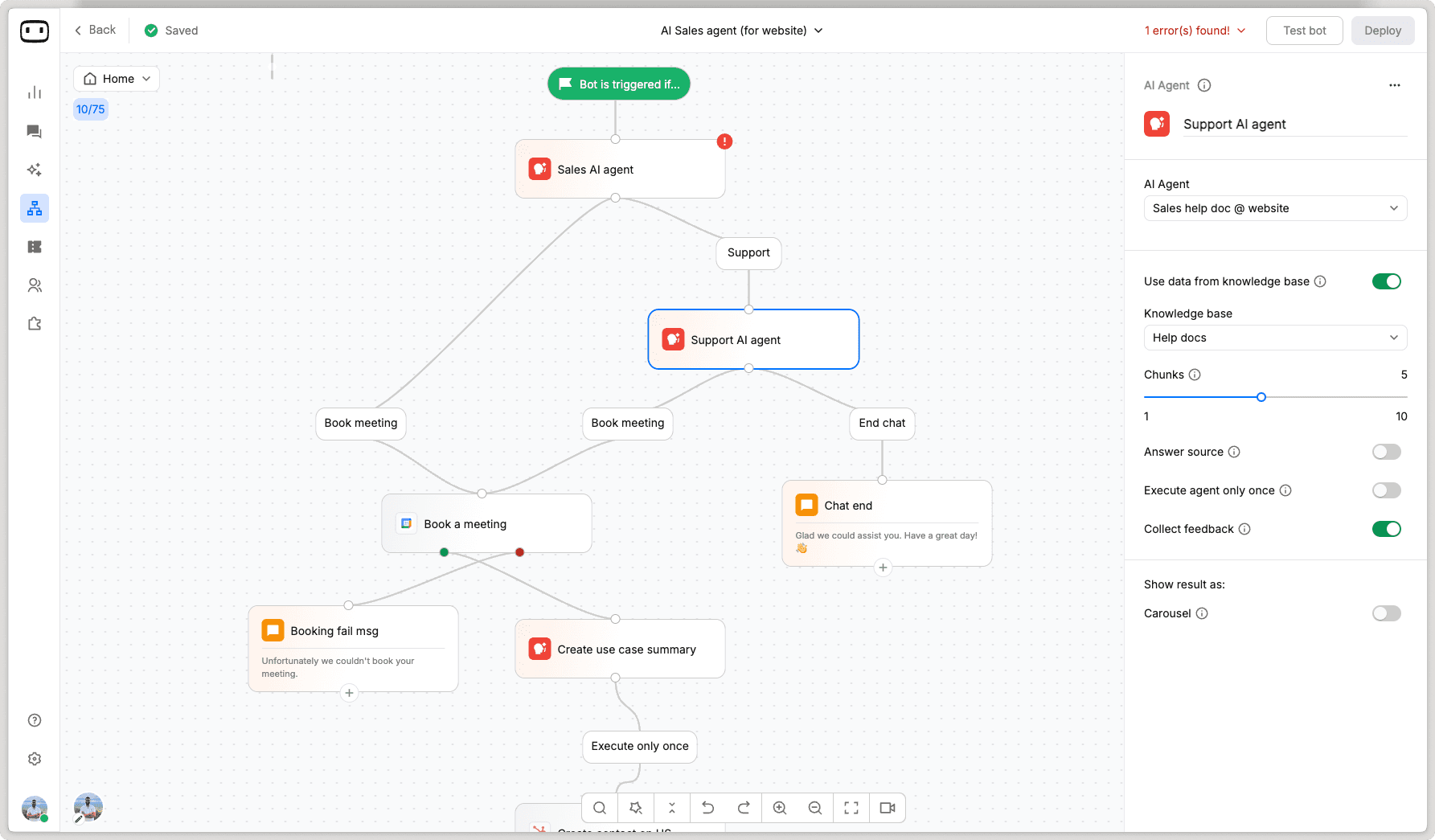
WotNot is a no-code AI agent platform used by teams across SMBs and enterprises for customer support, lead qualification, onboarding, and sales automation.
What makes it stand out is how it handles the handoff problem. Most platforms escalate to a human the moment the bot hits its limit, and the agent picks up cold.
WotNot preserves everything: intent, collected data, and full bot history. The agent sees it all before typing a single word. No repeated questions. No lost context.
The no-code bot builder deploys across websites, WhatsApp, Facebook Messenger, Instagram, and SMS from a single build.
Capabilities
Live Chat with human handoff
AI Chatbot and Automation
Outbound Bots and proactive campaigns
WhatsApp, Instagram, Facebook Messenger, and SMS
Knowledge Base Training (AI Studio)
CRM Integrations (Salesforce, HubSpot)
Appointment Booking (Google Calendar, Outlook)
Voicebot
Where it stands out
Zero-restart handoff: agents see intent, collected data, and bot history before they type a word
No model lock-in: switch between OpenAI, Anthropic, Gemini, and Mistral based on performance
Flat monthly pricing with no per-resolution fees
One build, every channel: website, WhatsApp, Facebook Messenger, Instagram, and SMS
The honest trade-off
The platform's depth means a real learning curve. If you need a basic chat widget for one channel, the Starter plan has more capability than you'll use on day one.
Best for
Teams running AI automation and human support together who need full context preserved across every handoff, without managing separate tools for each.
Pricing
Lite: $23/month (1,000 chats, 1,000 AI credits, no-code agent builder)
Starter: $79/month (5,000 chats, 5,000 AI credits, AI Studio, all LLM models)
Premium: $239/month (10,000 chats, 10,000 AI credits, Live Chat, hide branding)
Enterprise: Custom (unlimited chats, unlimited credits, professional services, on-prem hosting)
(All prices billed annually. 14-day free trial available.)
Start building, not just reading
Build AI chatbots and agents with WotNot and see how easily they work in real conversations.

Start building, not just reading
Build AI chatbots and agents with WotNot and see how easily they work in real conversations.
Start building, not just reading
Build AI chatbots and agents with WotNot and see how easily they work in real conversations.

2. Intercom

Intercom is an AI-first customer service platform used by SaaS and tech companies to handle support across live chat, email, voice, and social from one workspace.
The centrepiece is Fin, their AI agent. Unlike most AI agents that respond and hope for the best, Fin runs a validation step before sending a reply, which reduces the hallucination problem that plagues a lot of AI support tools.
It also works as a standalone product, so teams already on Zendesk or Salesforce can deploy Fin without migrating their entire helpdesk.
Capabilities
AI Agent (Fin) with autonomous resolution
Live Chat and Messaging
Voice Support
Email and Social Channels
Helpdesk and Ticketing
AI Copilot for human agents
Proactive Outbound Messaging
450+ integrations including Zendesk, Salesforce, and HubSpot
Where it stands out
Fin AI Engine with built-in response validation, reducing hallucinations in customer-facing replies
Standalone deployment: Fin works on top of Zendesk or Salesforce without requiring a full platform switch
Resolution-based pricing means you only pay when Fin actually resolves a conversation
The honest trade-off
Billing has multiple moving parts. The $0.99 per resolution fee compounds on top of your seat cost. During high-volume periods like product launches or seasonal peaks, costs become difficult to forecast. Budget for variability, not just the base price.
Best for
SaaS and tech companies that want an AI-first support platform, and teams already on Zendesk or Salesforce who want to add Fin without a full migration.
Pricing
Essential: $29/seat/month + $0.99 per Fin resolution
Advanced: $85/seat/month + $0.99 per Fin resolution
Expert: $132/seat/month + $0.99 per Fin resolution
Fin standalone: $0.99 per resolution (50 resolutions minimum per month)
Copilot add-on: $29/agent/month
(All seat prices billed annually. 14-day free trial available, no credit card required.)
3. Zendesk
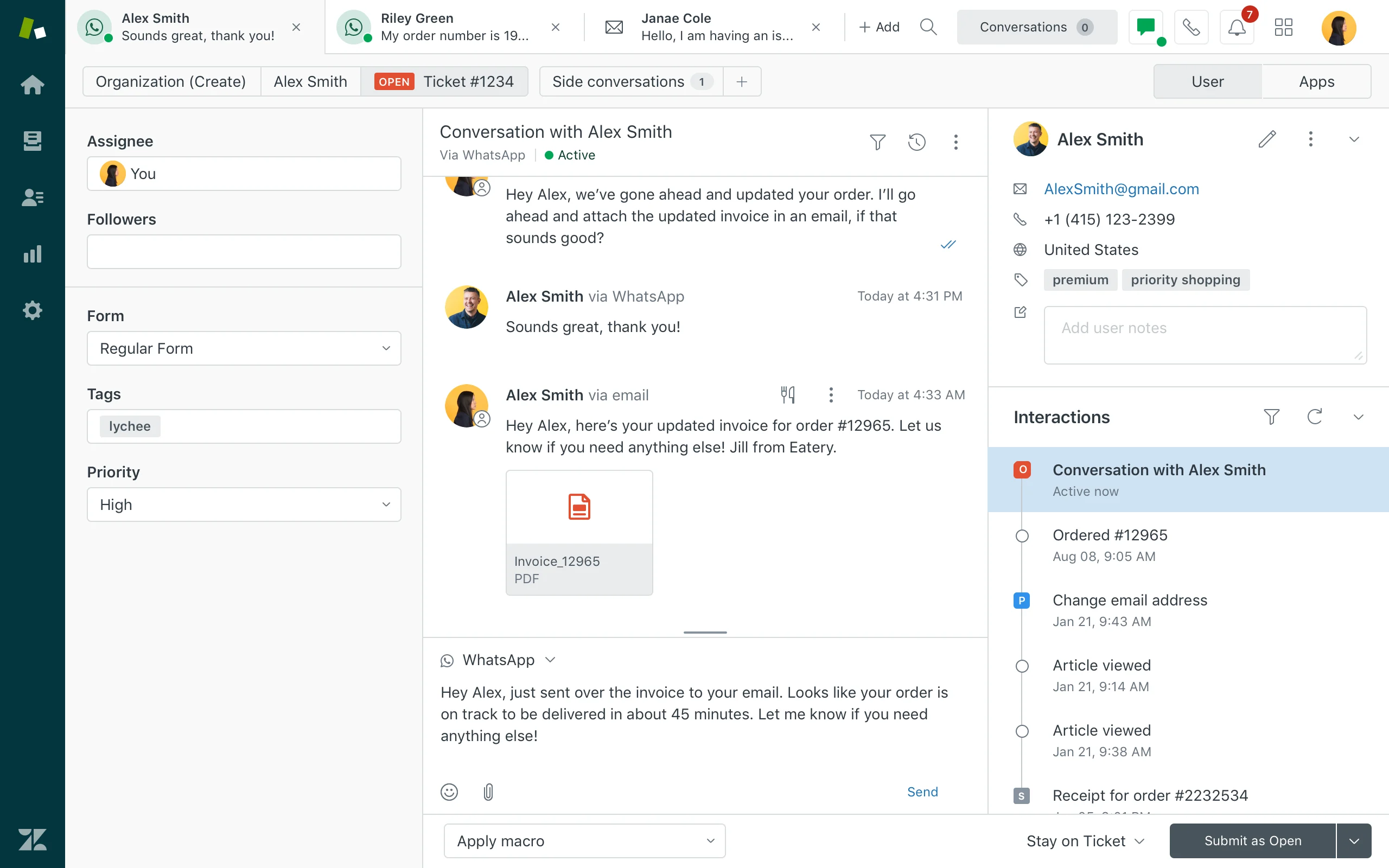
Zendesk is one of the most established helpdesk platforms in the market. It is used by mid-size and enterprise teams managing high support volumes across email, chat, voice, and social.
All Suite plans include multichannel ticketing, a branded help center, prebuilt analytics dashboards, and AI-powered automation.
With over 1,500 integrations, it connects to most tools that a large support team already runs. The platform has been around long enough that documentation is deep and implementation partners are widely available.
Capabilities
Ticketing and Help Desk
Live Chat and Messaging
Voice Support
Email and Social Channel Management
AI Agents and Automation
Self-Service Help Center
Analytics and Reporting
Workforce Management (add-on)
Quality Assurance (add-on)
Where it stands out
1,500+ pre-built integrations covering CRMs, billing platforms, workforce management, and analytics tools
Skills-based routing, SLAs, multilingual support, and HIPAA compliance within standard Suite plans
Large pool of implementation partners and extensive documentation for teams that need setup support
The honest trade-off
Most teams outgrow the base plan quickly and land at Suite Professional ($115/agent/month) to unlock routing, SLAs, and reporting. Advanced AI adds $50/agent/month on top. Real-world costs typically run two to three times the advertised base rate once AI, QA, and workforce management are factored in. Teams switching from another platform should also budget for a migration service, since moving tickets, macros, and historical data across cleanly is rarely a DIY job.
Best for
Large teams managing high support volumes across multiple channels who need a proven, deeply integrated platform built to scale.
Pricing
Suite Team: $55/agent/month
Suite Growth: $89/agent/month
Suite Professional: $115/agent/month
Suite Enterprise: $169/agent/month
Advanced AI add-on: $50/agent/month
Workforce Management add-on: $25/agent/month
Quality Assurance add-on: $35/agent/month
(All prices billed annually. 14-day free trial available.)
4. Freshdesk
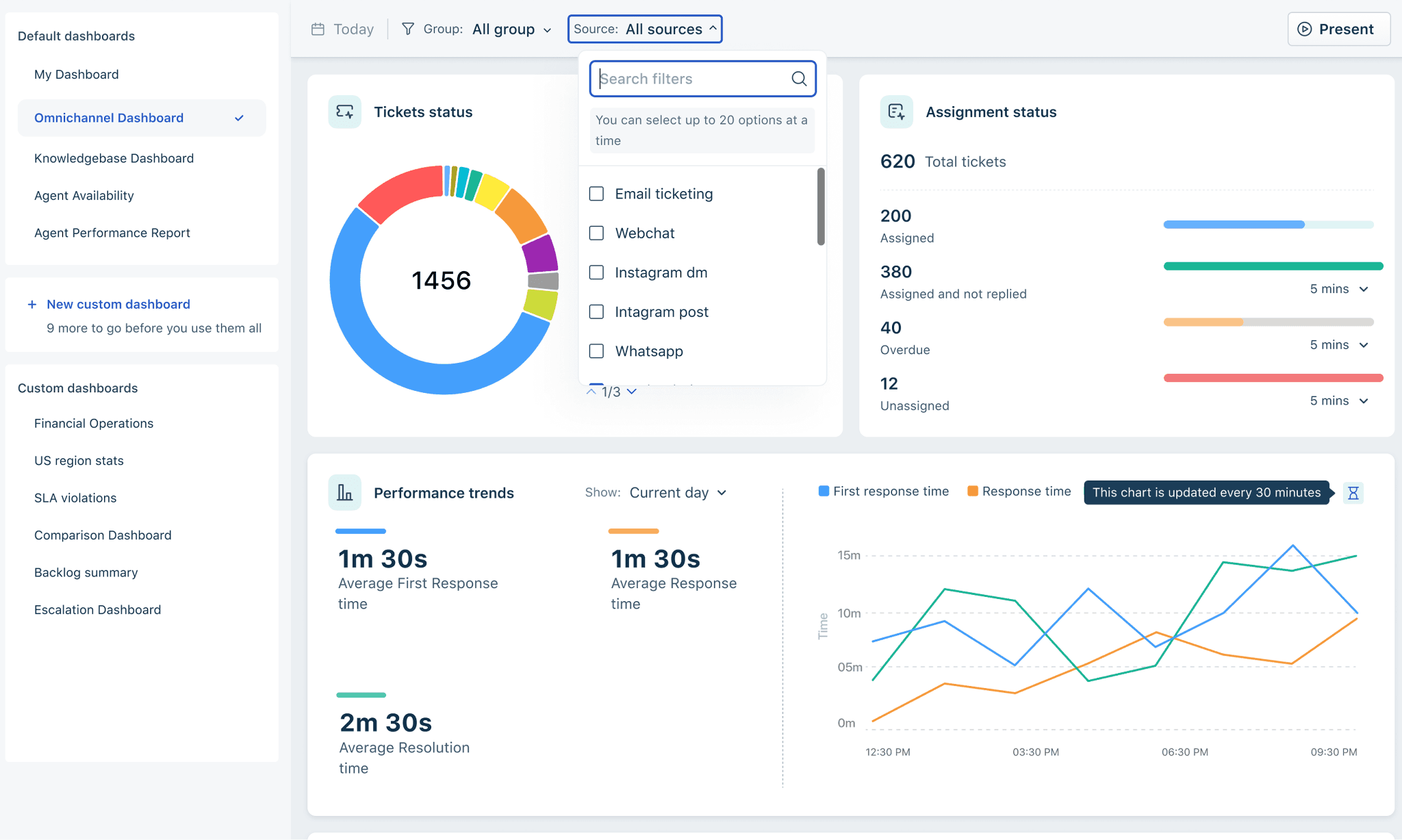
Freshdesk is a helpdesk platform built for teams stepping up from shared inboxes or spreadsheet-based tracking.
It comes in two versions: Freshdesk for email-first support, and Freshdesk Omni for teams managing conversations across email, chat, social, and voice from a unified inbox.
The core ticketing system is clean, automation rules are flexible, and most agents pick it up without formal training.
For growing teams that need structure without the complexity of an enterprise platform, it sits in a useful middle ground.
Capabilities
Ticketing and Help Desk
Email Support (all plans)
Live Chat and Messaging (Freshdesk Omni)
Voice Support (Freshcaller, separate product)
AI Automation (Freddy AI Agent)
AI Copilot for Human Agents (add-on)
Self-Service Knowledge Base
Analytics and Reporting
Where it stands out
Two product tracks: Freshdesk for email-first teams, Freshdesk Omni for multichannel, so you're not paying for channels you don't use
Clean interface that most agents learn without formal training, reducing onboarding time
Accessible entry pricing with a free tier and a Growth plan starting at $15/agent/month
The honest trade-off
Omnichannel, voice, and AI are all separate products or add-ons with separate pricing. A team starting on Freshdesk Growth at $15/agent/month can quickly land at $80 to $100/agent/month once Freshdesk Omni, Freddy AI Copilot, and AI Agent sessions are factored in. Budget for the full stack you need, not just the base plan.
Best for
Growing mid-market teams that need structured ticketing with solid automation, and want the flexibility to start email-first and expand to omnichannel as their operation scales.
Pricing
Freshdesk (email-first):
Free: Up to 2 agents
Growth: $15/agent/month
Pro: $49/agent/month
Enterprise: $79/agent/month
Freshdesk Omni (multichannel):
Growth: $29/agent/month
Pro: $69/agent/month
Enterprise: $109/agent/month
Add-ons:
Freddy AI Copilot: $29/agent/month
Freddy AI Agent Sessions: $100 per 1,000 sessions
(All base prices billed annually. 14-day free trial available.)
5. Help Scout
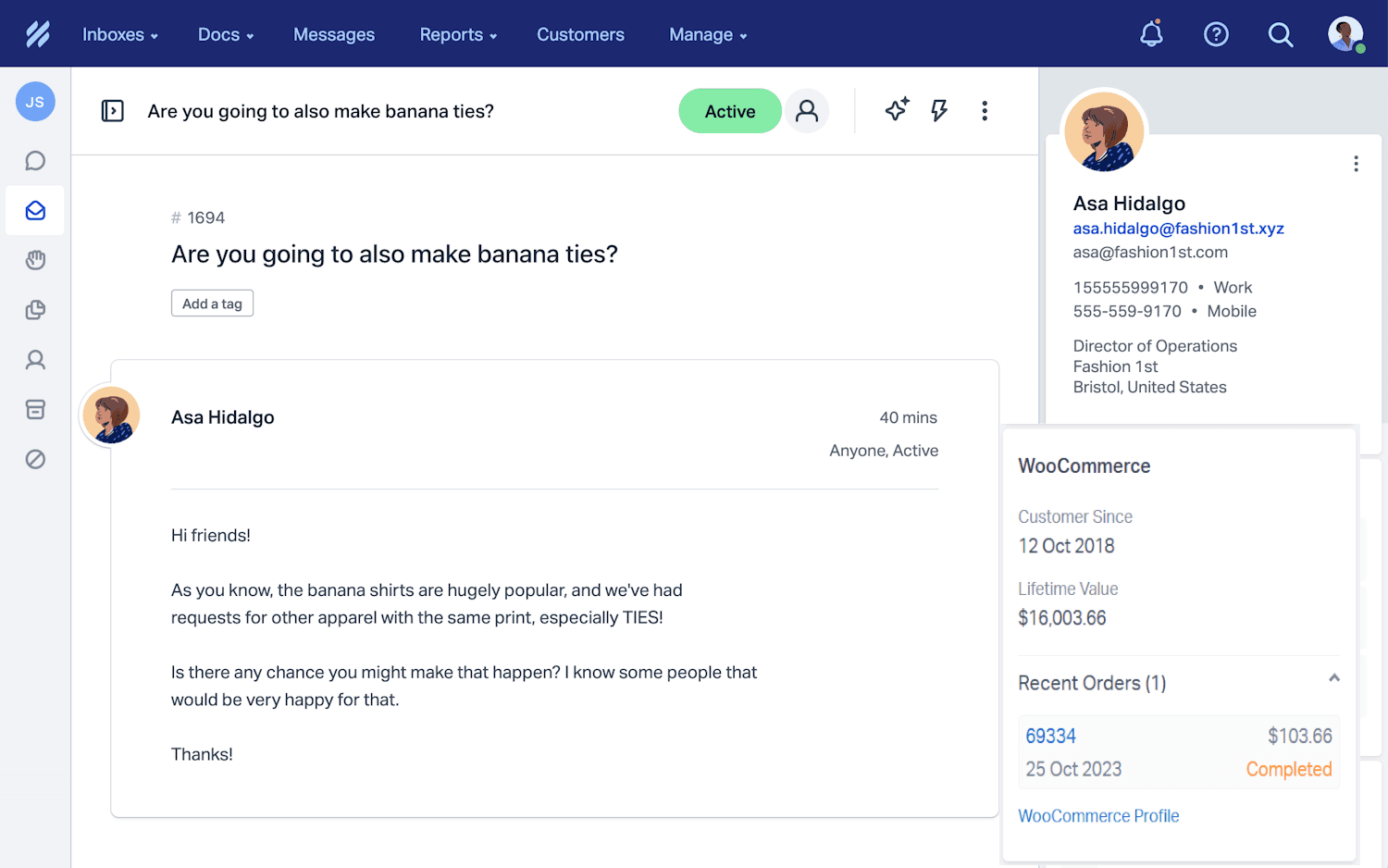
Help Scout is a customer support platform that trades feature depth for ease of use.
Agents work in what looks and feels like a shared email inbox, similar to setups like a google workspace mailbox, with no ticket number jargon and no complex status trees.
For teams where the quality of each customer interaction matters more than resolution throughput, that simplicity is the point.
It covers shared inbox, live chat, and knowledge base in one platform without needing add-ons for core functionality.
Capabilities
Shared Inbox (email-first)
Live Chat (Beacon help widget)
Knowledge Base (Docs)
AI Answers (per-resolution, 3-month free trial included)
In-App Messaging
Reporting and CSAT
Integrations: Salesforce, HubSpot, Jira (Plus plan and above)
Where it stands out
Clean, email-like interface that agents adopt quickly with minimal training
Free tier for up to five users with no credit card required, making it accessible before committing to a paid plan
Shared inbox, live chat, and knowledge base included without add-ons
The honest trade-off
Key integrations like Salesforce, HubSpot, and Jira are locked to the Plus plan at $45/user/month. Teams with high volumes, complex routing needs, or heavy automation requirements will hit the ceiling. It is built for conversation quality, not operational scale.
Best for
Small to mid-sized teams running email and chat-based support who prioritise conversation quality over automation depth, and want a clean interface that agents can pick up without formal training.
Pricing
Free: $0 — up to 5 users, 1 inbox, 1 Docs site, 100 contacts/month
Standard: $25/user/month — up to 25 users, unlimited contacts, AI Drafts
Plus: $45/user/month — up to 50 users, WhatsApp, Salesforce, HubSpot, Jira, round-robin routing
Pro: $75/user/month — unlimited users (minimum 10), unlimited workflows, SSO/SAML, HIPAA compliance
AI Answers: $0.75 per resolution (3-month free trial included)
(All paid plans billed annually. 15-day free trial on Standard and Plus, no credit card required.)
6. Tidio
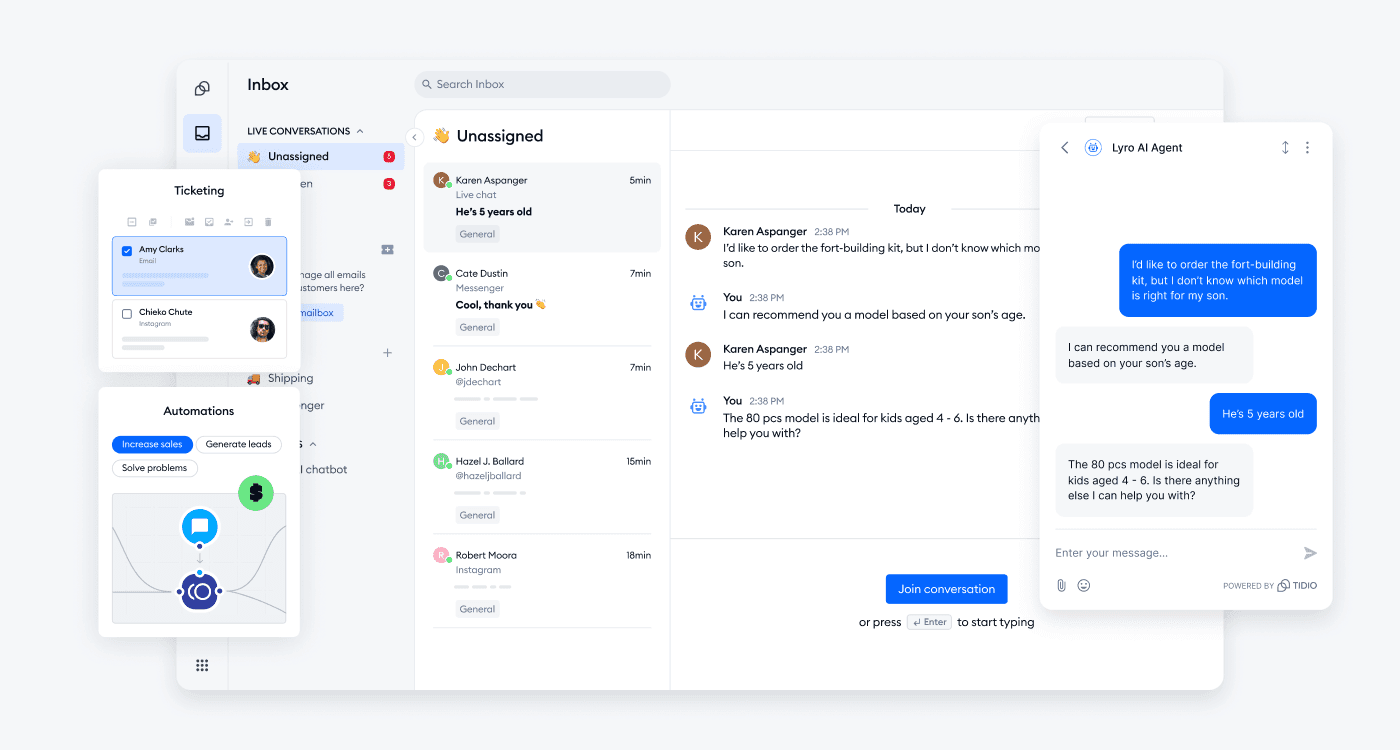
Tidio is an AI-driven customer service platform built for e-commerce brands and SMBs that need live chat, help desk, and AI automation without managing separate tools for each.
The platform combines a shared inbox, a no-code automation builder (Flows), and Lyro - its AI agent - in one workspace. Lyro is trained on your own content and handles up to 67% of customer questions automatically, handing off to a human agent with full context when it reaches its limit. No repeated questions, no lost conversation history.
What sets it apart from most SMB-focused tools is the integration depth with e-commerce platforms. Shopify, WooCommerce, and WordPress connections are native, and Tidio sits directly inside those storefronts rather than running alongside them.
Capabilities
Live Chat and shared inbox
Lyro AI Agent (trained on your content, automatic handoff)
Flows - no-code chatbot and automation builder
Help Desk and ticketing
Multichannel: website chat, email, Instagram, Messenger, WhatsApp
Integrations: Shopify, WooCommerce, WordPress, and more
Analytics and conversation reporting
Where it stands out
Lyro resolves up to 67% of queries automatically, trained on your own FAQ and website content
E-commerce native: deep integrations with Shopify, WooCommerce, and WordPress make it practical for online stores, not just an afterthought
Lyro stays within its knowledge boundaries – when it can't resolve an issue it hands off to a human agent with full context rather than guessing, reducing the hallucination risk common in AI support tools
The honest trade-off
Tidio's pricing scales by conversation volume rather than agent seats, which keeps costs predictable for most teams. The jump from Growth to Plus is significant, but Plus is designed for businesses that need custom conversation limits, multilanguage support, and a dedicated success manager – so the step up comes with a meaningful change in what the platform delivers, not just higher caps.
Best for
E-commerce brands and SMBs that want live chat, AI automation, and a shared inbox in one platform, with native connections to the major e-commerce stacks.
Pricing
Free: $0/month
Starter: $24.17/month (billed annually)
Growth: from $49.17/month (billed annually)
Plus: from $749/month
Premium: contact for pricing
7. Gorgias
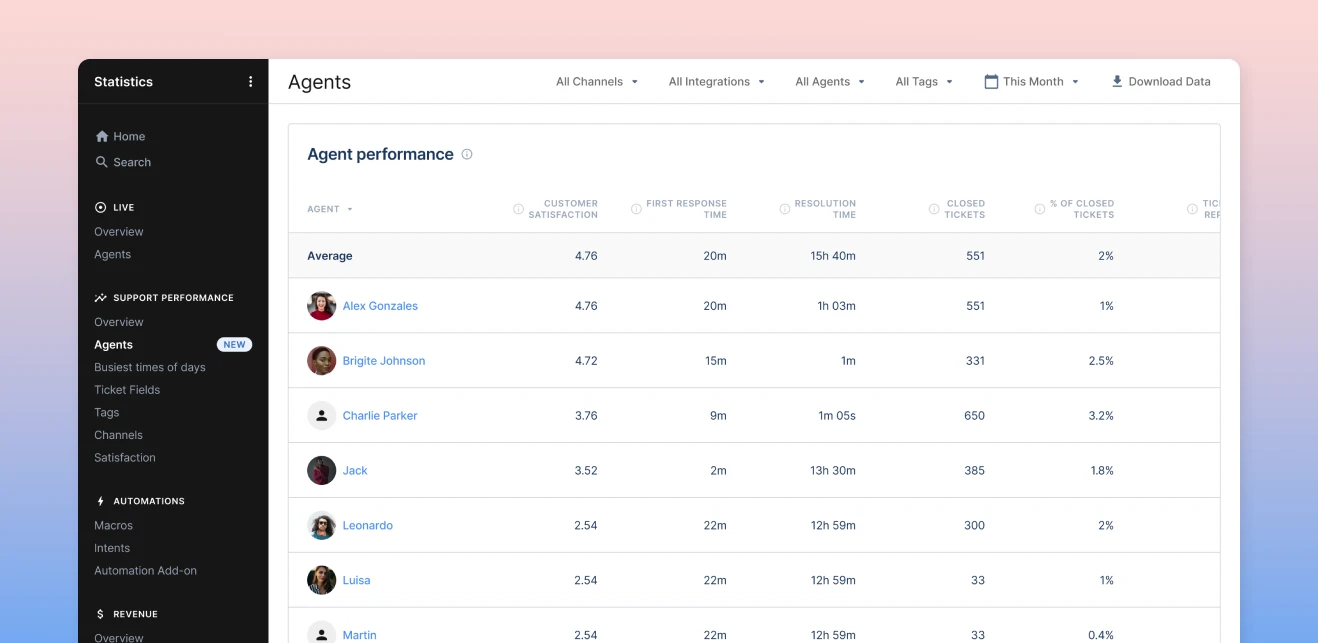
Gorgias is a helpdesk built specifically for e-commerce brands.
It supports Shopify, Magento, BigCommerce, and WooCommerce, but Shopify is where the integration runs deepest.
The core difference from a general helpdesk is that Gorgias pulls live order data directly into each ticket. An agent handling a return can see the full purchase history, edit the order, issue a refund, or trigger a discount code without leaving the helpdesk.
For brands where every support interaction touches an order, that context removes a lot of tab-switching.
Capabilities
Unified Helpdesk Inbox (email, live chat, Facebook, Instagram, TikTok, WhatsApp)
Voice and SMS (add-ons, priced per ticket)
AI Agent (handles returns, order edits, tracking, discount generation)
Rules-based Automation Engine
Order Management (edit orders, refunds, subscription changes from within tickets)
Revenue Statistics (Pro plan and above)
150+ integrations (Klaviyo, Recharge, Yotpo, Loop Returns)
Shopify, Magento, BigCommerce, WooCommerce
Where it stands out
Live order data embedded in every ticket: agents see purchase history and can take actions without leaving the interface
AI Agent handles e-commerce-specific actions like returns, order edits, and discount generation, not just FAQ responses
Ticket-based pricing with unlimited users means costs scale with support volume, not headcount
The honest trade-off
Pricing compounds fast. Helpdesk, AI Agent resolutions, Voice, and SMS are all billed separately. A Pro plan at $300/month can grow significantly once AI and channel add-ons are factored in. Teams not on Shopify or a major e-commerce platform will also find the integration depth significantly reduced.
Best for
E-commerce brands on Shopify or major e-commerce platforms that need support, order management, and AI automation in a single workspace without switching between systems.
Pricing
Helpdesk (billed annually):
Starter: $10/month — 50 tickets/month, up to 3 users
Basic: $50/month — 300 tickets/month, up to 500 users
Pro: $300/month — 2,000 tickets/month, up to 500 users, Revenue Statistics
Advanced: $750/month — 5,000 tickets/month, up to 500 users
Enterprise: Custom
AI Agent: $0.90/resolved conversation (annual) or $1.00/resolved conversation (monthly), billed on top of Helpdesk plan
Add-ons: Voice from $1.20/ticket; SMS from $0.80/ticket
(7-day free trial available. All Helpdesk plan prices billed annually.)
8. HubSpot Service Hub
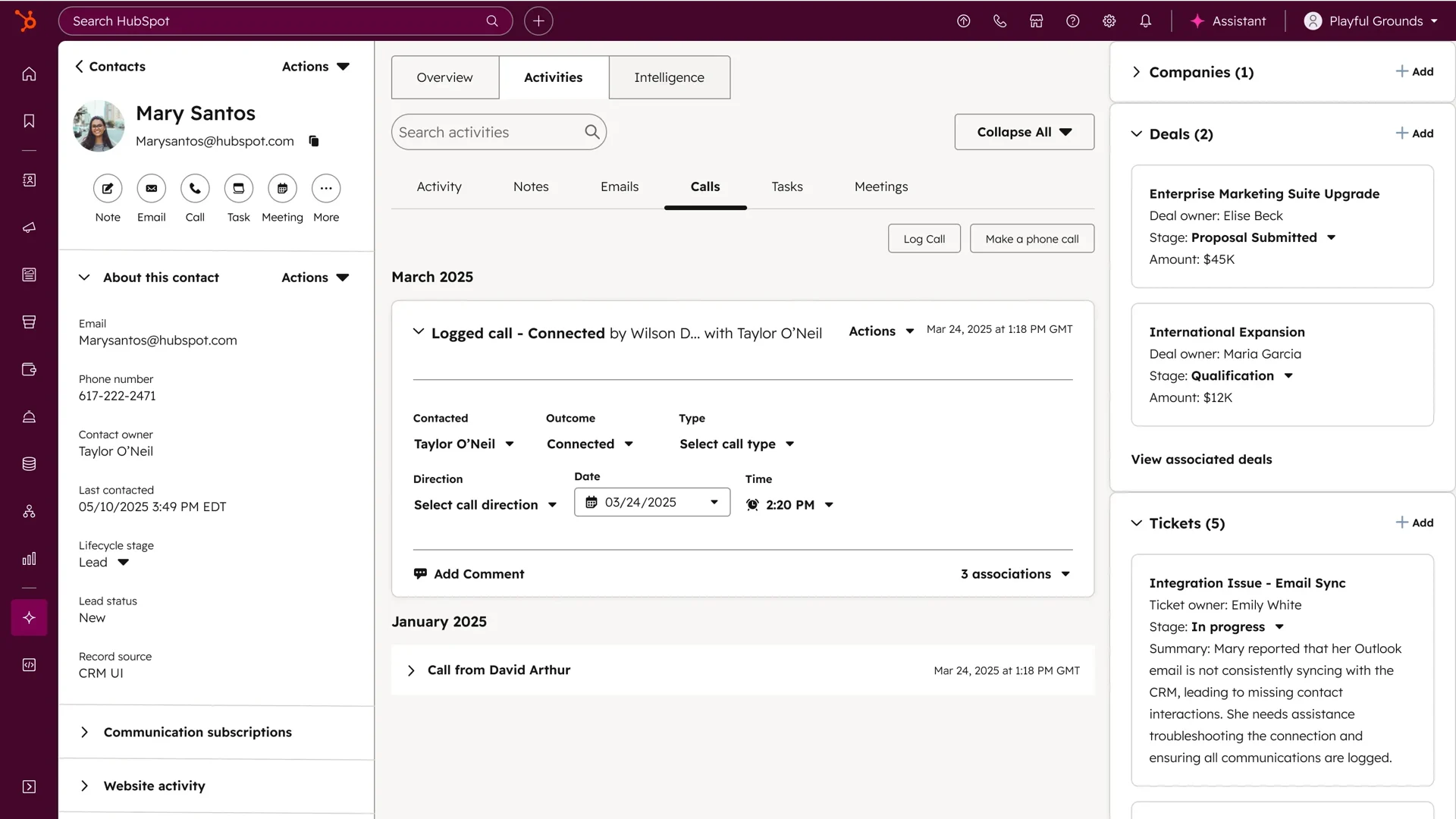
HubSpot Service Hub is a customer support platform built on top of HubSpot's CRM. Its main draw is that support, sales, and marketing all run on the same customer data.
For teams already using HubSpot across revenue functions, it extends what's already there rather than adding another tool to the stack.
Every ticket an agent handles sits inside the same CRM that tracks the customer's deal history, marketing interactions, and purchase timeline.
The platform covers ticketing, live chat, knowledge base, customer feedback surveys, and an AI agent that handles autonomous ticket resolution at the Enterprise tier.
Capabilities
Shared Inbox and Help Desk
Ticketing and SLA Tracking (Professional and above)
Live Chat and Omnichannel Messaging
AI Customer Agent, autonomous ticket resolution (Enterprise only, powered by Breeze AI)
Knowledge Base
Customer Feedback Surveys (NPS, CSAT, CES)
Customer Success Workspace (Enterprise)
1,500+ integrations, including Aircall, Jira, Microsoft Teams, Slack
Full HubSpot CRM connection across marketing, sales, and service
Where it stands out
Complete customer context in every ticket: agents see deal stage, marketing touchpoints, and purchase history without switching systems
Workflow automation at the Professional tier covers SLA tracking, ticket routing, escalation logic, and follow-up sequences, including Document Workflow Automation
For teams already on HubSpot, adding Service Hub avoids a separate platform entirely
The honest trade-off
Workflow automation and SLA tracking only unlock at Professional ($90/seat/month, plus a $1,500 onboarding fee). AI resolution requires Enterprise ($150/seat/month, minimum 10 seats, plus a $3,500 onboarding fee). Teams evaluating it purely as a helpdesk will find cheaper and simpler options elsewhere.
Best for
Teams already using HubSpot for sales and marketing who want support integrated into the same CRM, rather than adding another standalone tool to the stack.
Pricing
Free: $0 — up to 2 users, basic ticketing, shared inbox, live chat
Starter: $15/seat/month — conversation routing, basic ticket pipelines, no HubSpot branding
Professional: $90/seat/month — SLA tracking, workflow automation, knowledge base, customer feedback surveys. One-time onboarding fee: $1,500
Enterprise: $150/seat/month (10-seat minimum) — Breeze AI Customer Agent, advanced routing, customer success workspace. One-time onboarding fee: $3,500
(All prices billed annually. 14-day free trial available.)
9. Salesforce Service Cloud
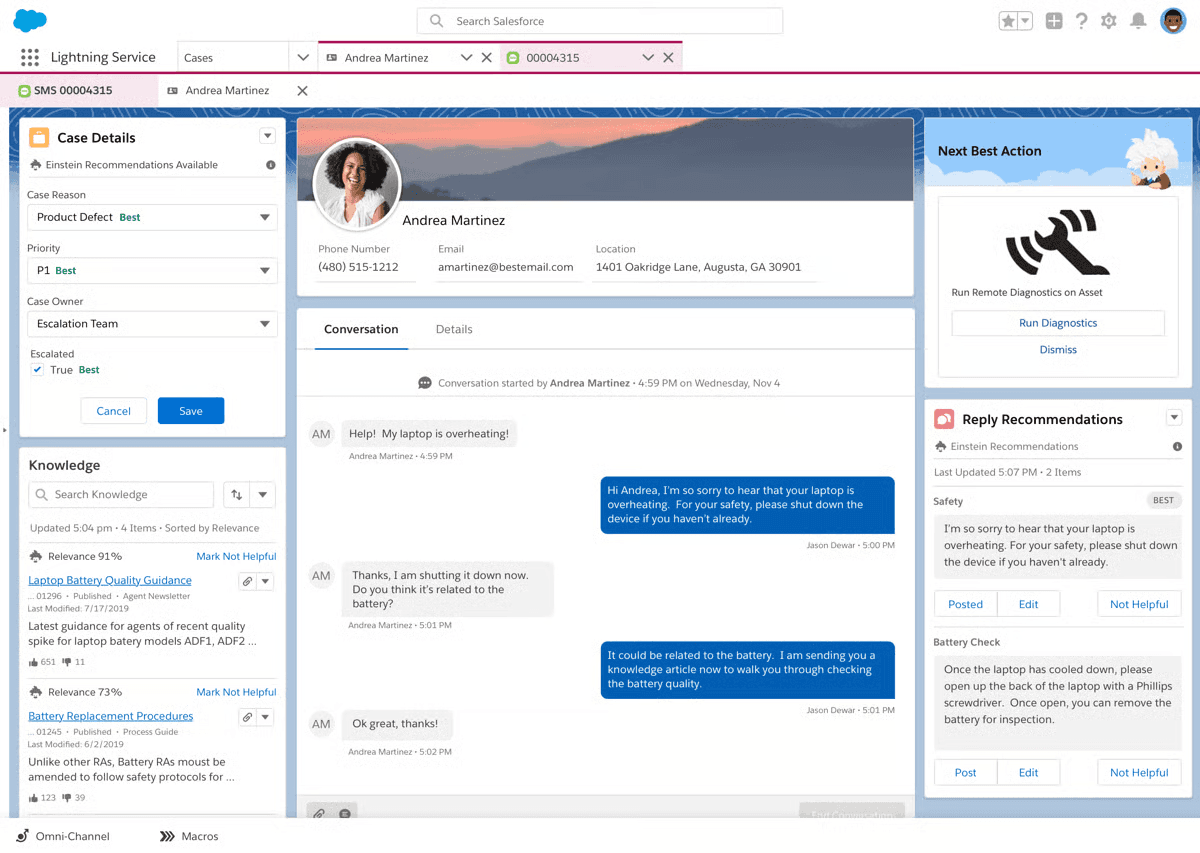
Salesforce Service Cloud is the support layer of the Salesforce platform. It is built for large enterprises that need case management, omnichannel support, and AI-assisted resolution inside the same ecosystem as their CRM.
For teams already running Sales Cloud, it extends what's already there into support operations. For organisations not on Salesforce, the calculus is different.
You are not just buying a helpdesk; you are buying into one of the most complex enterprise platforms in the market.
The platform has earned its reputation in large enterprise environments where support operations span multiple teams, products, and geographies.
Capabilities
Case Management and Omni-Channel Routing
Live Chat and Messaging (Enterprise and above, or add-on)
Voice (Salesforce Voice, add-on)
Agentforce for Service, AI autonomous case resolution (Enterprise and above)
Knowledge Base (read-write unlocks at Enterprise tier)
Self-Service Help Center and Service Portal
Workflow Automation and Flow Builder
Service Analytics and Dashboards
AppExchange: 4,000+ third-party apps and integrations
Where it stands out
Deep integration with Salesforce Sales Cloud: agents have full visibility into deal stage, purchase history, and customer health without switching systems
Agentforce handles complex autonomous service flows at scale, not just FAQ deflection. Businesses looking to deploy it effectively often require structured Agentforce implementation to integrate it with their existing Salesforce workflows and service operations.
Configurable to almost any business process, industry, or compliance requirement
The honest trade-off
The Enterprise plan at $175/seat/month is where most meaningful service features unlock. Chat, bots, and enhanced messaging require add-ons even at Enterprise. Teams without a Salesforce admin or implementation partner will struggle. Not a platform to evaluate if you need to be live in four weeks.
Best for
Large enterprises already on Salesforce that need a deeply integrated, highly configurable service platform and have the internal resources or implementation budget to manage it.
Pricing
Free Suite: $0 — up to 2 users, basic case management
Starter Suite: $25/user/month — simple CRM with service, sales, and marketing
Pro Suite: $100/user/month — enhanced automation, real-time chat, AppExchange access
Enterprise: $175/user/month — AI for service, self-service help center, workflow automation
Unlimited: $350/user/month — chat and bots, Salesforce Knowledge, Premier Success Plan
Agentforce 1 Service: $550/user/month — full AI suite, unmetered Agentforce, Tableau Next, Data Cloud credits
(All prices billed annually. 30-day free trial available.)
10. Zoho Desk
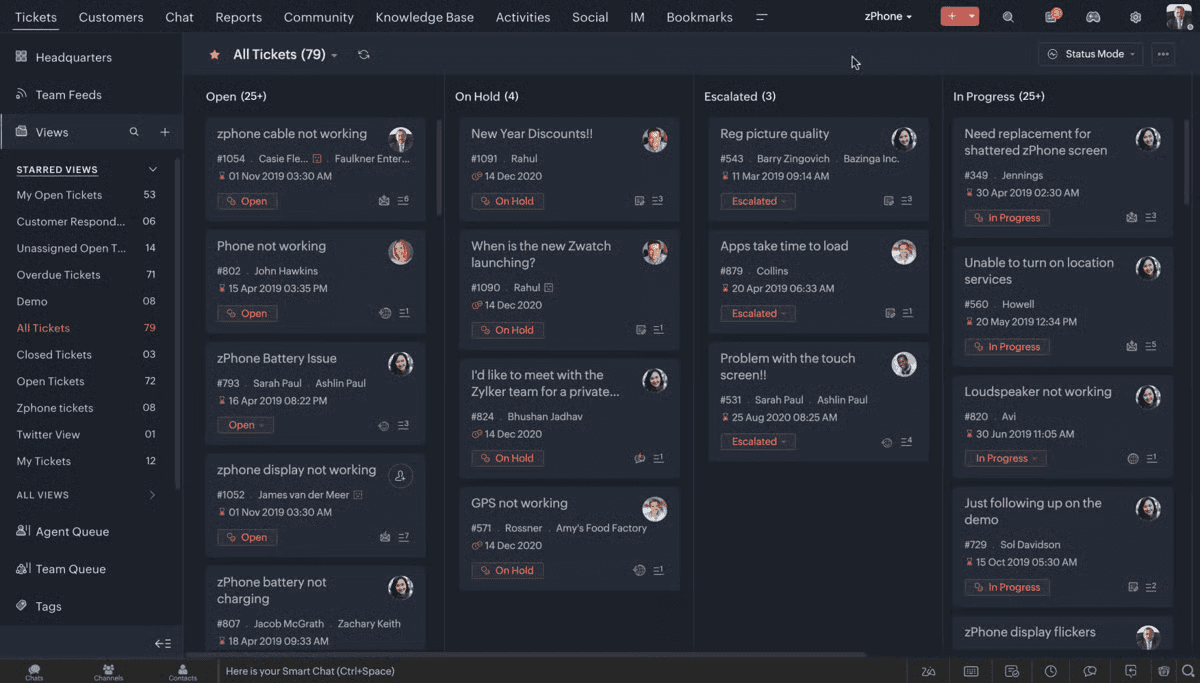
Zoho Desk is a helpdesk platform that sits inside the broader Zoho ecosystem. Its strongest argument is native integration with Zoho CRM, Zoho Analytics, and other Zoho products, where the customer record and the support ticket share the same data layer without any additional integration work.
Outside the Zoho ecosystem, it still holds up as a capable standalone helpdesk.
And, the pricing is among the most accessible on this list, and reviewers consistently call out the intuitive interface and fast onboarding as genuine strengths.
Capabilities
Ticketing and Help Desk (email, web forms, social media)
Instant Messaging (WhatsApp, Instagram, Facebook Messenger, Telegram, WeChat, Line) on Standard and above
Live Chat via Zoho SalesIQ (Enterprise only)
AI Agents, Answer Bot, and Zia AI Assistant (Enterprise only)
Knowledge Base and Self-Service
Blueprint process automation (Professional and above)
Telephony integration (Professional and above)
Multi-brand Help Center (Enterprise only)
Zoho CRM, Zoho Analytics, and broader Zoho ecosystem integrations
Where it stands out
Tight native integration with Zoho CRM gives support agents full customer context without switching platforms
Pricing is one of the most accessible on this list, with a free tier and a well-featured Standard plan at $14/user/month
Self-configurable without ongoing consultant fees, which reviewers call out as a meaningful cost advantage over platforms like Salesforce
The honest trade-off
Live chat, Zia AI, and multi-brand support are all locked to the Enterprise plan at $40/user/month. Teams that need AI-assisted support have to upgrade every agent, not just the ones who will use it. Teams outside the Zoho ecosystem also get significantly less value, as integration depth with non-Zoho tools is narrower than that of competitors.
Best for
Businesses already using Zoho CRM or other Zoho products that want support integrated into the same ecosystem, and growing teams that need structured ticketing at accessible pricing before committing to a full enterprise platform.
Pricing
Free: $0 — up to 3 agents, basic email ticketing
Express: $7/user/month — up to 5 agents, social media, web forms, workflows
Standard: $14/user/month — unlimited agents, instant messaging, knowledge base, custom reports
Professional: $23/user/month — unlimited agents, telephony, Blueprint automation, multi-department, round-robin assignment
Enterprise: $40/user/month — unlimited agents, live chat, Zia AI, AI Agents, Answer Bot, multi-brand help center, sandbox
(All prices billed annually. 15-day free trial available, no credit card required.)
11. ProProfs Help Desk
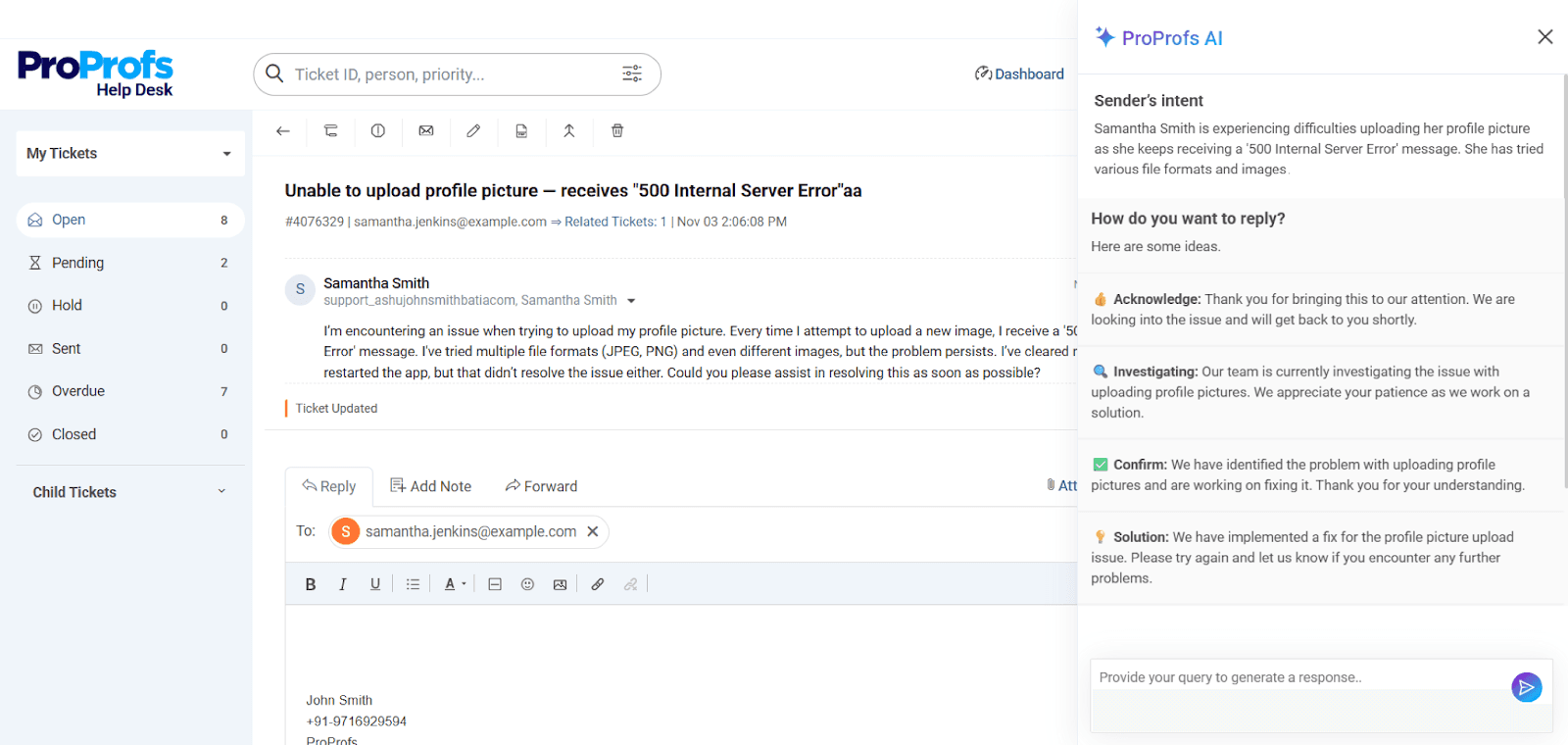
ProProfs Help Desk is a customer support platform built for teams that want AI-assisted ticketing without the complexity of enterprise tools.
The interface is clean and centered around a shared inbox, making it easy to manage conversations across email, chat, social, SMS, and WhatsApp from one place.
Its built-in AI focuses on practical use cases—summarizing tickets for quick context and suggesting replies to speed up responses. For teams handling repetitive queries, this can noticeably reduce resolution time.
Where it stands out
Simple, intuitive interface with minimal setup required
AI-powered ticket summaries and reply suggestions improve agent efficiency
Shared inbox with collision detection and internal notes keeps teams aligned
“Customer Delight Suite” bundles help desk, chat, knowledge base, and surveys into one platform
The trade-off
Cloud-only platform with no on-premise option. Also lacks a dark mode, which can be a minor inconvenience for agents working long hours.
Best for
Growing and mid-sized teams that want AI-assisted support, omnichannel coverage, and a clean shared inbox without the complexity of enterprise platforms.
Pricing
Free: $0 — single agent, all premium features included
Team: $19.99/user/month (billed annually) — unlimited tickets, multiple inboxes, automation, reporting, API access, and mobile apps
White Label add-on: $300/year
Customer Delight Suite: from $499/month — Help Desk + Live Chat + Knowledge Base + Survey Maker + Qualaroo
(15-day money-back guarantee. No credit card required for trial.)
12. CloudTalk
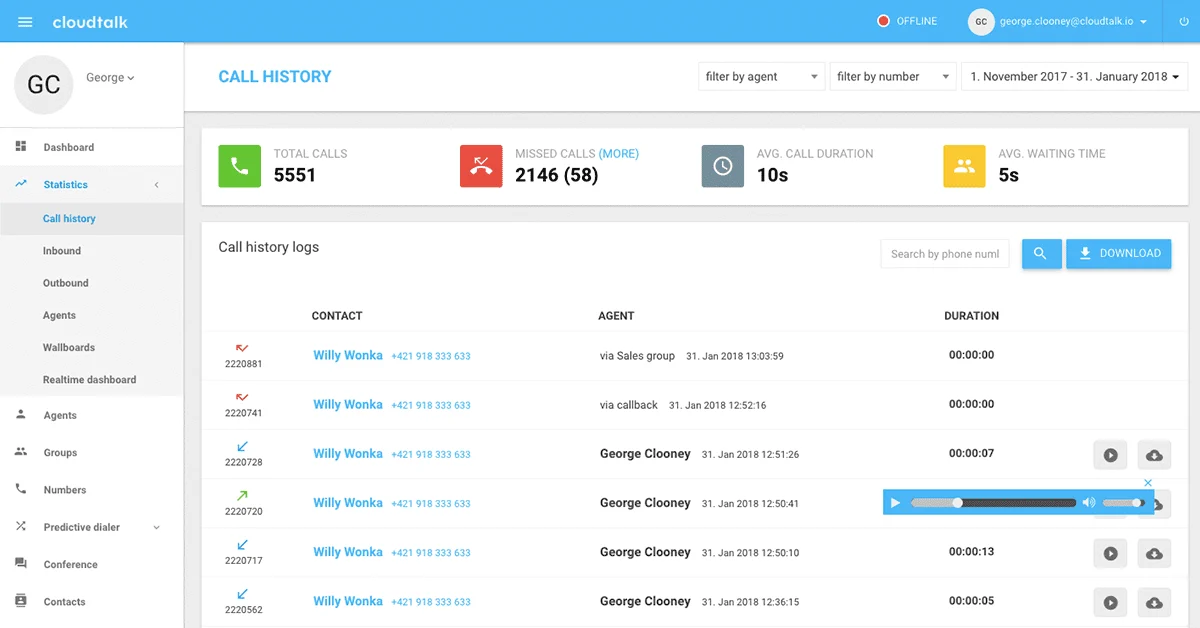
CloudTalk is a cloud-based inbound call center platform designed for customer support teams that handle high call volumes. It combines AI voice agents, smart routing, IVR, and conversational intelligence in one workspace — with 100+ native CRM and helpdesk integrations and local number coverage across 160+ countries.
The centrepiece is CeTe, their AI Voice Agent. It handles inbound calls around the clock in 60+ languages and accents, with human-like conversation quality and the ability to transfer to a live agent when the situation calls for it. A separate AI Receptionist layer manages call greetings and initial triage before routing, so callers reach the right person faster and agents spend less time on repetitive first-touch interactions.
Underneath the AI layer sits a mature call center stack: IVR menus, smart call routing, real-time monitoring, and a Call Flow Designer that lets non-technical teams build custom call paths without writing code. The Conversational Intelligence suite auto-generates call summaries, transcriptions, sentiment scores, and CRM notes after every call — reducing after-call admin significantly.
Capabilities
AI Voice Agent (CeTe) — inbound & outbound, 24/7, 60+ languages
AI Receptionist for call greeting and first-touch triage
IVR (Interactive Voice Response) with Call Flow Designer
Smart call routing and call queuing
AI Conversational Intelligence (summaries, transcripts, sentiment, call scoring, topic extraction)
AI Notes and automatic CRM sync
Real-time monitoring and agent coaching
Power, Preview, and Parallel dialing modes for outbound
International numbers in 160+ countries
International SMS and WhatsApp messaging
100+ native integrations including HubSpot, Salesforce, Pipedrive, Zendesk, and Intercom
Where it stands out
Voice-first architecture: purpose-built for call-heavy support teams, not a voice add-on bolted onto a chat platform
CeTe AI Voice Agent handles full inbound conversations end-to-end — not just greetings or FAQs — with seamless handoff to human agents
160+ country coverage with local numbers makes it practical for global teams without multiple telephony vendors
Conversational Intelligence turns every call into structured CRM data automatically, eliminating manual note-taking
The honest trade-off
AI Voice Agents are priced separately at $0.25 per minute on top of your seat cost, which can make budgeting harder for high-volume inbound teams. Advanced features like the AI Sales Dialer and parallel dialing modes are reserved for higher-tier plans, so smaller teams may find themselves upgrading sooner than expected as their needs grow.
Best for
Customer support and sales teams for whom phone is the primary support channel — especially those managing high inbound call volumes, operating across multiple geographies, or looking to automate first-line call handling without giving up the option of live agent escalation.
Pricing
Lite: $19/user/month (annual) — basic inbound calling, 1 local number, per-minute outbound
Essential: from ~$25/user/month — advanced routing, analytics, IVR, core integrations
Expert: from ~$49/user/month — AI features, power dialer, advanced reporting
Custom: quote-based — dedicated account manager, custom SLA, enterprise features
AI Voice Agent (CeTe): $0.25/min (add-on, available on any plan)
14-day free trial available
Start With the Problem, Not the Platform
No single tool on this list is the right answer for every team. The right answer depends on where your support operation actually breaks down today.
If context disappears at handoff, the problem is probably your AI and live chat setup. If agents are switching between five tabs to answer one ticket, the problem is CRM integration. If your team is growing faster than your ticketing system can handle, the problem is structure.
The tools that serve teams best are rarely the most feature-rich ones. They're the ones that solve the specific gap without adding three new ones.
WotNot was built for teams where AI automation and human support need to work together without the seams showing. If that's the problem you're trying to solve, it's worth exploring what that looks like for your operation.
FAQs
FAQs
FAQs
What are the best AI customer support tools in 2026?
What is the difference between a helpdesk and a live chat tool?
Do I need AI in my customer support stack?
What should I look for when evaluating customer support software?
Which customer support tools help reduce customer churn?
ABOUT AUTHOR
Hardik Makadia
Co-founder & CEO, WotNot
Hardik leads the company with a focus on sales, innovation, and customer-centric solutions. Passionate about problem-solving, he drives business growth by delivering impactful and scalable solutions for clients.

Start building your chatbots today!
Curious to know how WotNot can help you? Let’s talk.
Start building your chatbots today!
Curious to know how WotNot can help you? Let’s talk.