
Let’s build your chatbot today!
Launch a no-code WotNot agent and reclaim your hours.
*Takes you to quick 2-step signup.
Nowadays, whenever you open a website, a chat bubble always appears, asking how they can help you. These are called chat widgets, chatbots embedded within a website, and are meant to help visitors out with their queries related to that website.
But has it ever occurred to you why chat widgets are everywhere?
In the past, website widgets had very limited functionality, which was answering questions. However, now chatbots have integrated with AI and have become way more intuitive.
There are a number of use cases where you can employ a chat widget, and it will handle the task like a human agent would in a fraction of the time and money.
You can set up a chat widget to:
Qualify leads
Answer FAQs
Recommend products
Seek human assistance
Stop the visitor from leaving
Handle bookings
Other than the abovementioned uses, there are tons of other uses. However, if you’re here, you already are in need of a chat widget for your business.
I have curated some of the best chat widgets for websites, which you can allocate to important tasks to drive visitor engagement and sales. I have looked at all these chatbots closely, seeing what kind of user experience they provide, and the process of setting them up and their implementation has also been taken into consideration.
I’ll discuss each and every tool in detail, but first, cover some basic ground before we dive deep into the chat widget world.
What Is a Chat Widget?
For those who are new to this, a chat widget is a small interactive interface embedded on a website, typically as a floating button in the bottom corner. It lets visitors communicate with a business in real time.
Some chat widgets connect visitors to live human agents. Others use AI to respond automatically. The most effective ones combine both, routing conversations to AI first and handing off to a human when the conversation requires it.
Did You Know?
According to Zendesk CX Trends, 86% consumers have said that quicker responses and accurate resolutions highly influence whether they purchase a product or service from a brand.
Best Chat Widgets At a Glance
Before we get into the detailed breakdowns, here is a quick snapshot. If you are scanning for the best chat widget for website deployment, this table gives you the shortlist.
Platform | Best For | G2 Rating | Starting Price (Monthly) |
WotNot | AI-first teams that need multi-channel deployment | 4.6/5 | $29/month |
Tidio | Small e-commerce stores on Shopify | 4.7/5 | $29/mo |
Tawk.to | Teams with zero budget for chat software | 4.5/5 | Free |
LiveChat | Support teams that prioritize agent productivity | 4.5/5 | $25/agent/month |
Intercom | Funded startups and mid-market SaaS companies | 4.5/5 | $39/seat/month |
Crisp | Budget-conscious startups wanting clean UX | 4.6/5 | $45/month |
ChatBot | Teams wanting an AI chatbot widget without a live chat dependency | 4.4/5 | $25/user/month |
Freshchat | Mid-market teams in the Freshworks ecosystem | 4.4/5 | $19/agent/month |
Zendesk Chat | Enterprise teams with complex routing needs | 4.3/5 | $25/agent/month |
Let’s build your chatbot today!
Launch a no-code WotNot agent and reclaim your hours.
Let’s build your chatbot today!
Launch a no-code WotNot agent and reclaim your hours.
Why Do You Need a Chat Widget?
Do you know why customers abandon a website? Most of the time, the reason is a lack of customer support, other times, it’s the attention span.
A chat widget can be a true savior in these scenarios.
It allows visitors to get quick and efficient assistance with any issues or questions they may have. These widgets eliminate the need for visitors to grapple with the website, schedule a call with human agents, or wait for an answer to their email.
This can lead to increased customer satisfaction and loyalty.
A chat widget can also improve the efficiency of a business's customer service operations. By streamlining communication, representatives can reduce response times and improve overall customer support.
Moreover, businesses can quickly engage with website visitors and gather information about their needs and interests. This can help to identify potential leads and improve the sales and marketing efforts.
Chat widgets can also help increase sales by giving personalized recommendations to help your customers with buying decisions. Customer support teams can also leverage chat widgets for handling routine questions and providing instant support.
According to a survey by Kayako, 41% of customers prefer live chat over other forms of customer support.
A survey conducted by CrazyEgg found that 38% of consumers are more likely to buy from a company if they offer live chat support.
These statistics and facts demonstrate that chat widgets can effectively improve customer satisfaction, engagement, and sales.
9 Best Chat Widgets for Your Website in 2026
Every tool below has been evaluated on the same criteria: ease of setup, AI capabilities, multi-channel reach, integration depth, and pricing transparency. Here is what each one actually does well, where it falls short, and who it is best for. No feature cards. No cheerleading. Just an honest evaluation of where each chat widget for website deployment stands in 2026.
1. WotNot
Rating: 4.6 (G2)
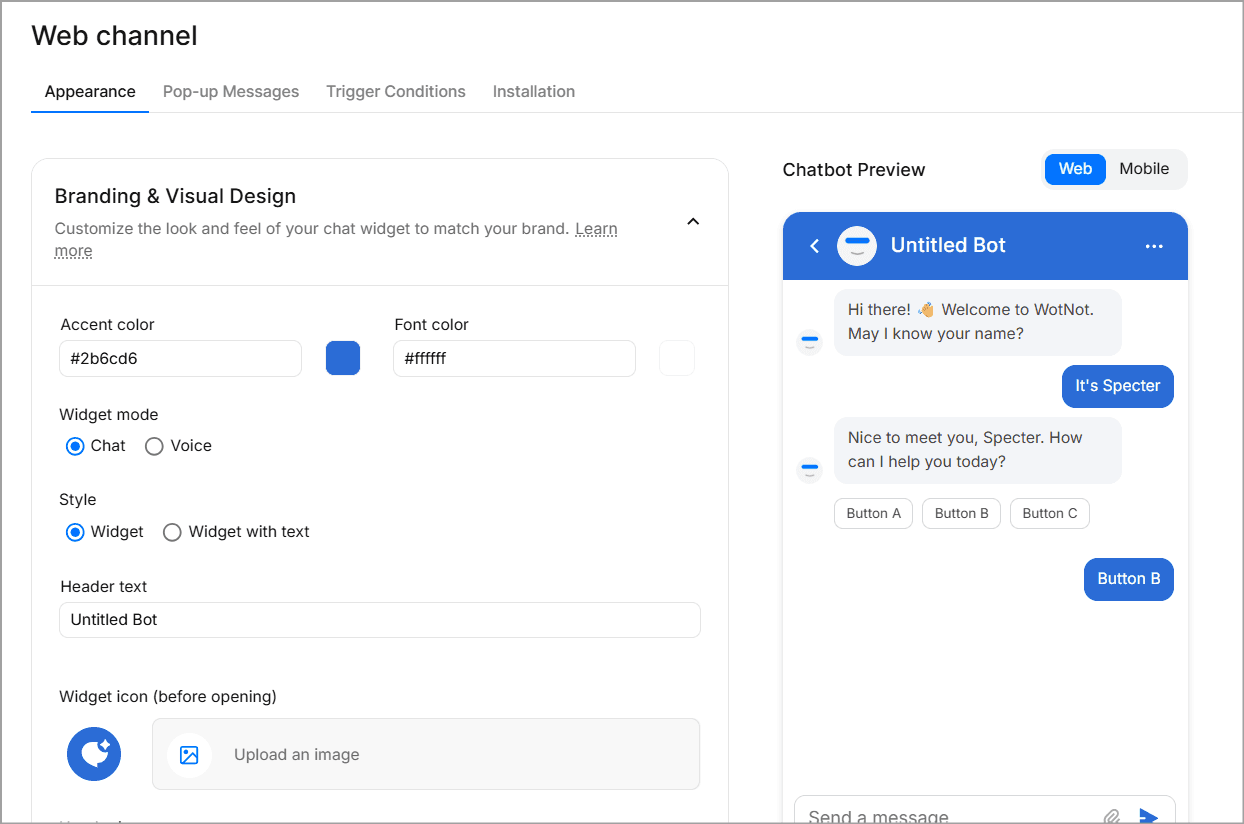
WotNot is a no-code AI agent platform that can be deployed as a chat widget across web, WhatsApp, Facebook Messenger, Instagram, and SMS.
WotNot brings to the table what teams are looking for. They have automation for handling the repetitive queries and live agents for the complex issues.
All of this, in a single platform, managing across every channel their customers use.
Most tools on this list started as live chat and added AI later. WotNot was built around AI from the start, with live chat added as part of human handoff.
What separates WotNot from the other options on this list is AI Studio. It supports multiple LLMs, including OpenAI, Anthropic, Gemini, and Mistral, lets you train the AI on your own knowledge base using RAG, and allows you to switch models without retraining.
The live chat experience deserves a specific mention. When a conversation escalates to a human agent, the agent can see the conversation history, the visitor's intent, and all the related data. The context carries over completely.
Capabilities:
No-code bot builder with drag-and-drop design
AI Studio with multi-LLM support
RAG-based AI training on your own knowledge base
Deploy across web, WhatsApp, Facebook Messenger, Instagram, SMS
Live Chat with full context preservation on human handoff
Outbound bots and proactive campaigns
Voicebot capabilities
Integrations with Salesforce, HubSpot, Zoho CRM, Zendesk, Freshdesk, Slack, Google Calendar, Calendly
Where it stands out:
AI-first architecture means automation is the default, not an add-on
Multi-LLM support lets you switch AI models without retraining your knowledge base
Human handoff preserves full conversation context, including intent and collected data
Deploys across web, WhatsApp, Messenger, Instagram, and SMS from a single builder
The honest trade-off: WotNot's strength is in AI-powered automation and multi-channel deployment. If all you need is a simple live chat box with no bot capabilities, the platform may feel like more than what you need. The free trial gives you 14 days to test, but there is no permanent free tier.
Best for: Teams that want an AI agent handling the front line of customer conversations across multiple channels, with human agents stepping in only when needed. Particularly strong for lead qualification, customer support automation, and appointment booking.
Pricing:
Lite: $29/month gives 1,000 chats, 1,000 AI credits, a no-code builder, and Zapier integration
Starter: $99/month comes with 5,000 chats, 5,000 AI credits, AI Studio, all LLM models, and integrations.
Premium: $299/month awards 10,000 chats, 10,000 AI credits, Live Chat, hide branding, and a custom widget.
Enterprise: Custom pricing brings unlimited chats, unlimited credits, SSO, and professional services.
Start building, not just reading
Build AI chatbots and agents with WotNot and see how easily they work in real conversations.

Start building, not just reading
Build AI chatbots and agents with WotNot and see how easily they work in real conversations.
Start building, not just reading
Build AI chatbots and agents with WotNot and see how easily they work in real conversations.

2. Tidio
Rating: 4.6 (G2)
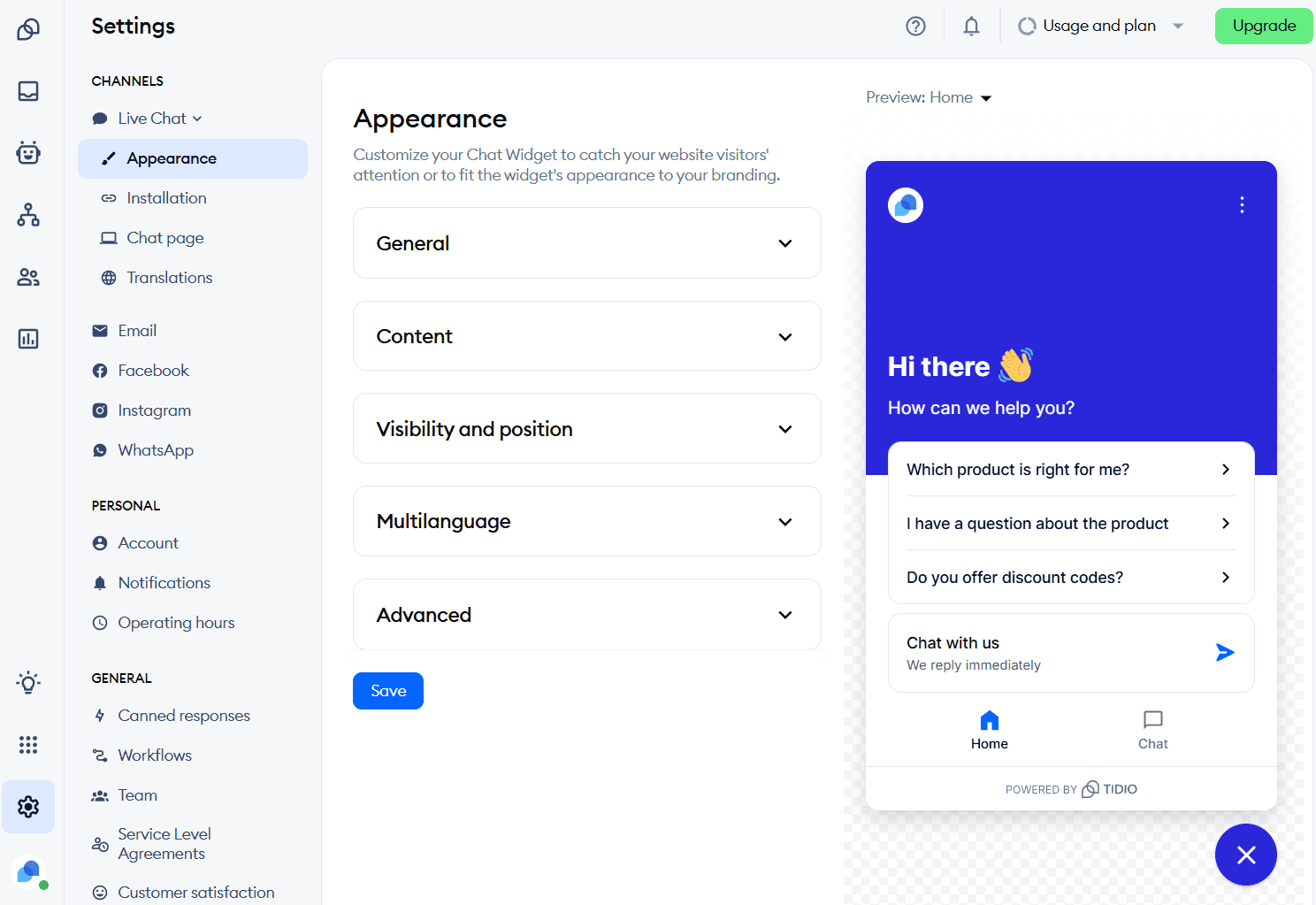
Tidio is a customer communication platform that combines live chat, AI chatbots (Lyro), and a help desk wrapped into one. This tool is built primarily for small e-commerce businesses.
If you run a Shopify store and need a chat widget installed in under five minutes, Tidio will fit you perfectly. The Shopify integration is native, the widget looks clean, and the free plan lets you test the platform without a commitment.
Tidio's strength is in its initial ease of use, especially for teams that have never used a chat tool before.
Where things get more complex is Tidio's pricing structure. The base plan prices look affordable, but Lyro (the AI chatbot) and Flows (automation) are billed as separate add-ons. This means adding AI to your plans can skyrocket your monthly Tidio bill.
Capabilities:
Live chat with real-time visitor monitoring
Lyro AI chatbot for automated responses
Multichannel inbox (web chat, email, Messenger, Instagram)
Pre-built chatbot templates for e-commerce
Shopify, WordPress, and Squarespace integrations
Mobile apps for iOS and Android
Where it stands out:
Fastest Shopify integration of any tool on this list
Free plan includes 50 conversations per month for testing
The multichannel inbox unifies web, email, and social conversations in one view
Lyro AI can resolve up to 67% of common customer questions when properly trained
The honest trade-off: Pricing can escalate quickly once you need advanced features. Lyro AI starts at $39/month on top of your base plan. Flows automation starts at $29/month extra.
Best for: Small e-commerce businesses on Shopify or WordPress that want an easy-to-install chat widget with the option to add AI as they grow. Less suited for teams needing multi-channel deployment beyond web and social, or businesses outside e-commerce.
Pricing:
Free: 50 conversations/month, basic live chat
Starter: $29/month (100 conversations)
Growth: $59/month (250+ conversations, analytics, permissions)
Plus: $749/month (unlimited conversations, dedicated success manager)
Lyro AI add-on: from $39/month (50 AI conversations)
Flows add-on: from $29/month (2,000 visitors reached)
3. Tawk.to
Rating: 4.5 (G2)
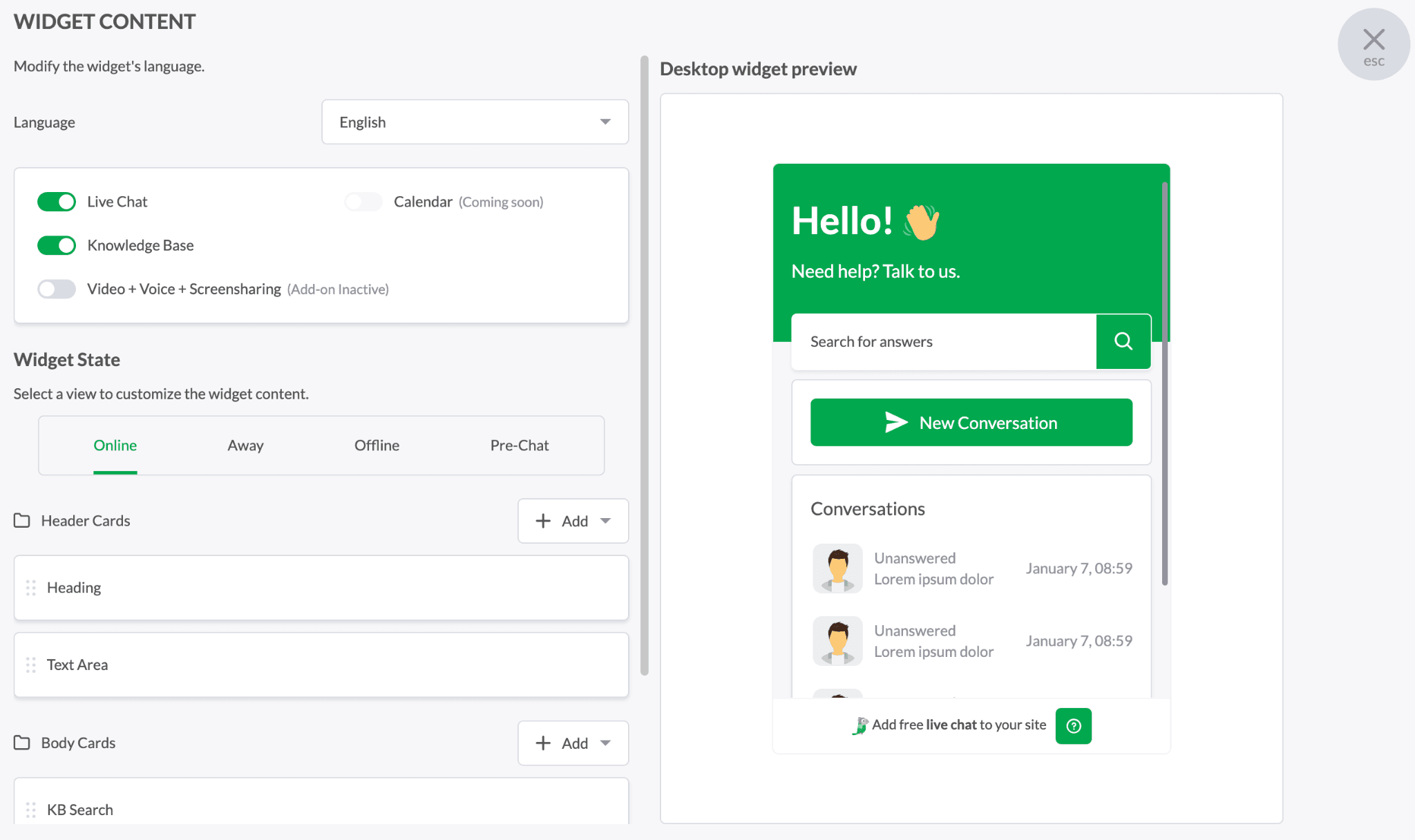
Tawk.to is a free live chat widget used by over 5 million websites, making it one of the most widely deployed chat tools in the world.
Unlimited agents, unlimited chats, unlimited websites, the platform gives away all of this for free, making it a rage among Reddit users.Tawk.to makes money by selling optional add-on services like hired chat agents and branding removal.
The widget setup takes minutes, whether you're on WordPress, Shopify, Wix, or a custom-built site.
For bootstrapped teams that need a chat presence and have little to no budget, Tawk.to is the practical choice. The widget supports 100+ languages, includes real-time visitor monitoring, and offers both desktop and mobile apps.
AI Assist has been added to help draft responses and summarize conversations, though it leans more toward agent support than full autonomous resolution.
Capabilities:
Unlimited agents, chats, and websites on the free plan
Real-time visitor monitoring and tracking
Canned responses and chat triggers
GEO IP tracking and visitor history
Ticketing system built in
100+ language support
Mobile apps for iOS and Android
Where it stands out:
Genuinely free with no conversation limits or agent caps
100+ language support makes it viable for international businesses
The ticketing system is included at no extra cost
Hired agents available at $1/hour for teams that cannot staff chat themselves
The honest trade-off: Tawk.to's AI capabilities are minimal compared to platforms like WotNot or Tidio. There is no native AI chatbot that can resolve conversations autonomously. The widget's design options feel dated compared to newer competitors, and some users report that the widget occasionally fails to appear on their site.
Best for: Startups, freelancers, and small businesses that need a live chat presence without any budget. Works best when you have someone available to respond in real time.
Pricing:
Free: All core features, unlimited everything
Remove branding: $19/month
Hired agents: $1/hour
Video + voice + screen sharing: $29/month
4. LiveChat
Rating: 4.4 (G2)
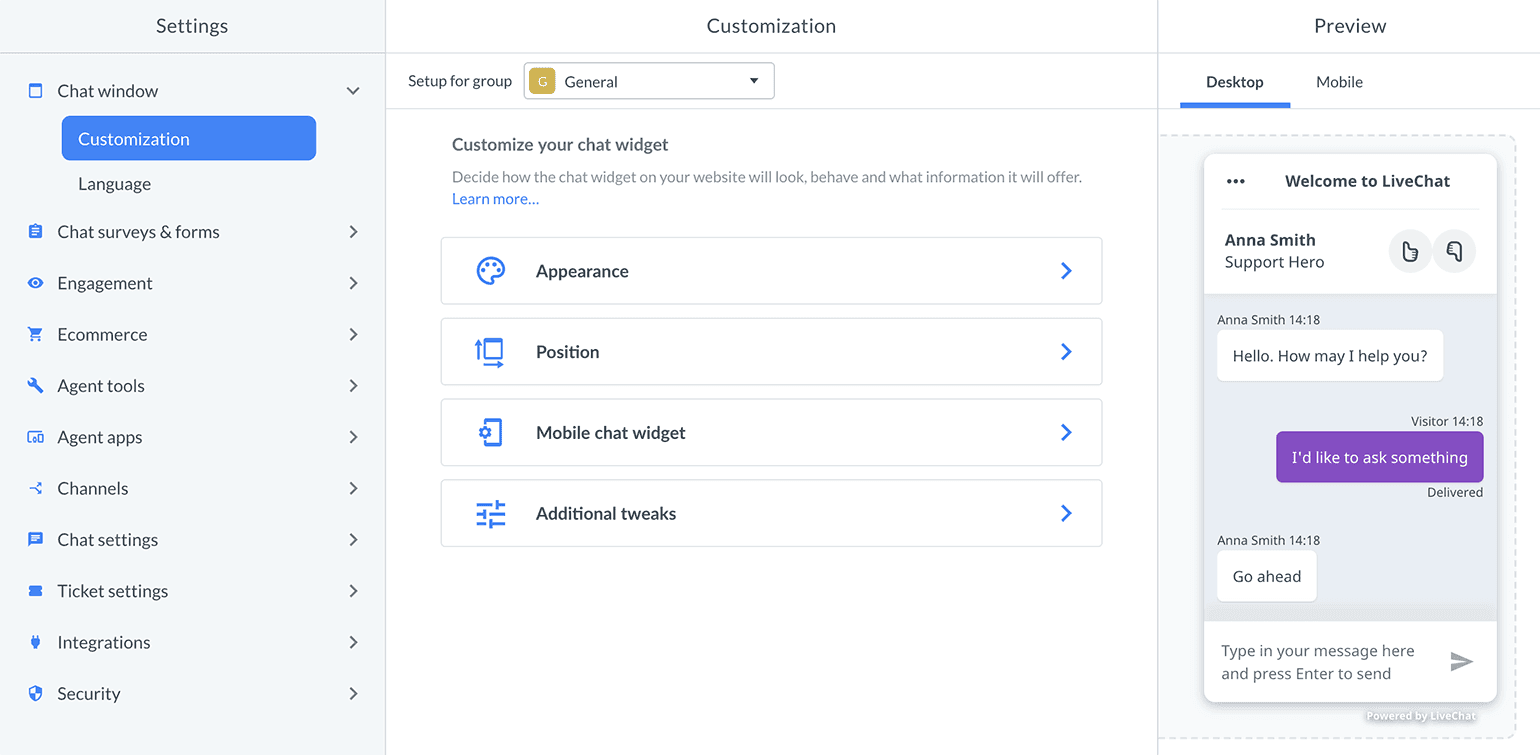
LiveChat is a dedicated live chat and help desk platform used primarily by mid-size support and sales teams that prioritize agent productivity.
It's consistently rated as a premium live chat solution on G2 and Capterra, with enterprise teams and mid-market companies as its main client demographic.
The platform offers insight into what visitors type before they hit send, chat routing, and pre-saved responses, all of which make it a better chat widget.
On the widget side, you get rich messaging capabilities, so you're not limited to plain text. Think product cards, carousels, buttons, and quick replies embedded right in the chat window, which is a big deal if you're trying to guide visitors toward a purchase or a booking.
The product focuses squarely on the live chat experience. AI capabilities exist through a separate product called ChatBot, but it requires a separate subscription.
This means LiveChat is best understood as a human-first tool with AI available as an add-on, not an AI-first platform.
Capabilities:
Real-time live chat with message sneak peek
Canned responses and chat tags
Agent performance reporting and staffing predictions
Proactive chat invitations based on visitor behavior
Widget customization with eye-catchers and greetings
Integrations with 200+ tools, including CRMs and help desks
Mobile, desktop, and web apps
Where it stands out:
Message sneak peek gives agents a few extra seconds to prepare a response
Agent reporting is among the most detailed on this list
Staffing prediction helps teams plan agent availability based on chat volume
The widget loads fast and supports Apple Business Chat integration
The honest trade-off: Per-agent pricing adds up fast. Adding ChatBot for AI capabilities raises the subscription price even more. LiveChat is also web-focused; WhatsApp and Instagram require marketplace add-ons, not native integrations.
Best for: Support and sales teams of 5 or more agents that want a deep live chat tooling, detailed reporting, and do not need AI as their primary interaction layer. Less suited for small teams or those wanting AI-first automation.
Pricing:
Starter: $25/agent/month (billed annually)
Team: $59/agent/month (billed annually)
Business: $89/agent/month (billed annually)
Enterprise: Custom pricing
ChatBot (AI): Separate product, from $52/month
5. Intercom
Rating: 4.5 (G2)
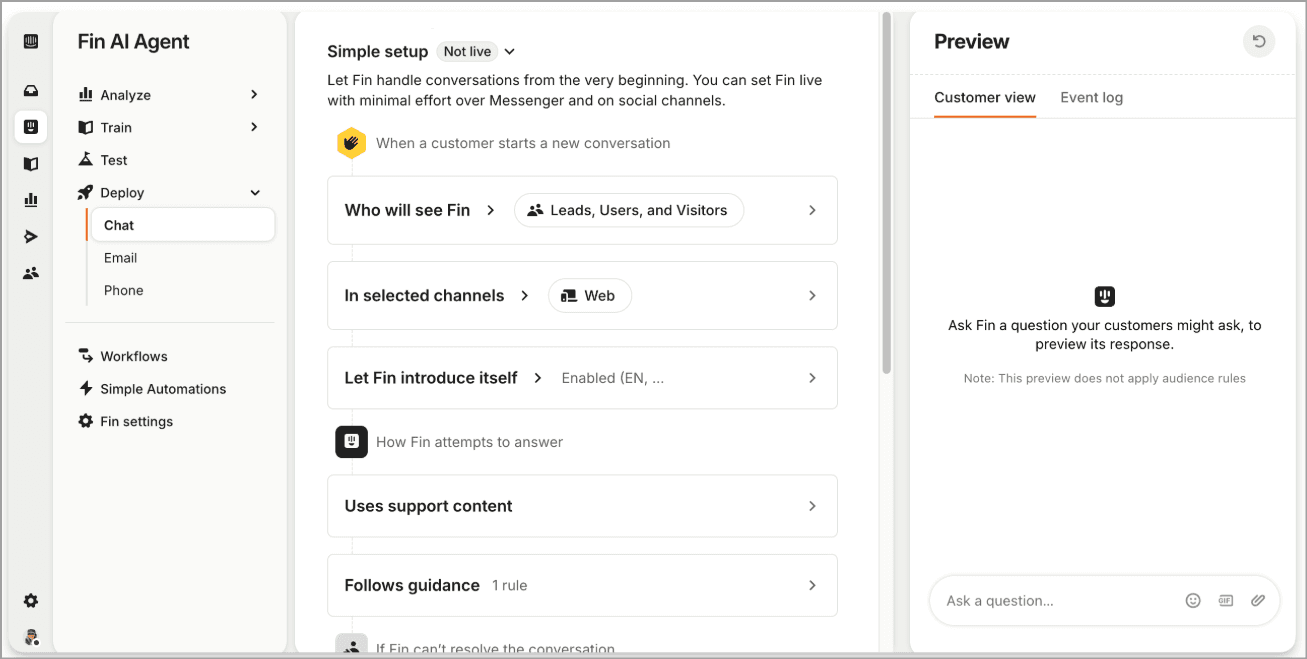
Intercom is an AI-first customer service platform built around its AI agent Fin and a modern messenger widget. It is frequently cited by analysts and SaaS publications as the benchmark for AI-first customer communication.
If you've spent time inside Intercom's ecosystem, you know it's less of a chat widget and more of a full-blown customer platform.
The messenger looks polished with the Fin AI resolving conversations with impressive accuracy. This efficiency is the result of the tool taking references from the help center, past conversations, and custom data sources available on all your channels.
However, the challenge is cost. Intercom uses a seat-plus-usage pricing model. You pay per agent seat, then pay $0.99 for every conversation Fin AI resolves. That per-resolution fee sounds small until you do the math. As your AI gets better and resolves more, your Fin bill goes up proportionally.
Capabilities:
Fin AI agent with $0.99/resolution pricing
Modern messenger widget with rich media support
Workflow automation with conditional logic
Shared inbox for team collaboration
Help center and knowledge base
Proactive messaging, product tours, and surveys (add-on)
Integrations with Salesforce, HubSpot, and 300+ tools
Where it stands out:
Fin AI's resolution quality is among the best in the category
The messenger widget design sets the standard for modern SaaS chat
Workflows can handle complex routing, assignment, and escalation logic
Fin can be purchased as a standalone AI layer on top of other help desks
Pro Tip: Before committing to any chat widget, run a 14-day trial with your actual support volume. Most teams test with five demo conversations and wonder why the tool fails at 500. Pull your last 30 days of support tickets, categorize the top 10 question types, and test whether the widget's AI can actually handle them.
The honest trade-off: Intercom's total cost is significantly higher than listed prices. The per-resolution model means your costs grow as your AI improves, which creates an unusual dynamic where success costs more. Smaller teams or budget-conscious companies will find better value elsewhere.
Best for: Funded SaaS companies and mid-market teams that can budget for variable AI costs and want the best-in-class messenger experience. The Early Stage program (90% off in year one) makes it viable for qualifying startups.
Pricing:
Essential: $39/seat/month (monthly billing)
Advanced: $99/seat/month (annual billing required)
Expert: $139/seat/month (annual billing required)
Fin AI: $0.99/resolved conversation (on top of seat costs)
Early Stage program: 90% off year one for qualifying startups
6. Crisp
Rating: 4.5 (G2)
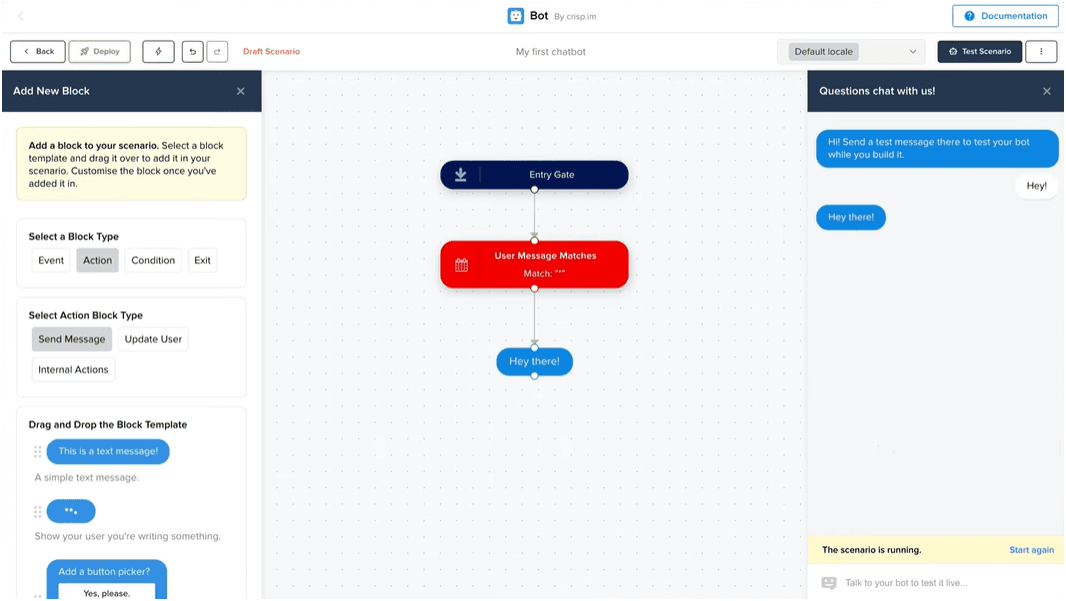
Crisp is an all-in-one customer messaging platform that charges per workspace rather than per agent, making it one of the more predictable pricing models on this list.
While most competitors charge per agent or per conversation, Crisp charges a flat monthly fee per workspace regardless of how many agents use it or how many conversations you handle.
For growing teams, that means your chat costs stay flat even as you add support staff.
You get live chat, a shared inbox, a knowledge base, a CRM, email campaigns, and even co-browsing, all bundled together. Their AI layer, branded as Crisp AI, handles automated replies using your knowledge base content and learns from past conversations.
The chat widget is lightweight, loads fast, and comes with a MagicBrowse feature that lets agents see a visitor's screen in real time and even navigate alongside them.
The chatbot builder uses a visual no-code flow editor and supports API calls within flows.
Capabilities:
Live chat with MagicType (pre-send typing preview)
Shared inbox for email, chat, Messenger, WhatsApp, Instagram, and Telegram
No-code chatbot and workflow builder
Knowledge base with AI-powered search
Co-browsing and screen-sharing (MagicBrowse)
Analytics and conversation insights
API and 100+ integrations
Where it stands out:
Flat per-workspace pricing means no cost surprises as your team grows
Co-browsing is included, which is rare at this price tier
The free plan is permanent (not a trial) with 2 agent seats
Unlimited conversations on all plans, including free
The honest trade-off: Crisp's AI capabilities are limited on the Essentials plan (50 AI uses per month). To get unlimited AI, you need the Plus plan at €295/month. The platform is bootstrapped and smaller than competitors like Intercom or Zendesk, which means the integration ecosystem is narrower, and enterprise-grade features like SSO and audit logs are only available on the highest tier.
Best for: Startups and growing teams that want predictable pricing, a clean interface, and basic AI capabilities without per-agent cost scaling. Particularly strong for teams of 5 to 15 agents where per-agent pricing from competitors would be prohibitive.
Pricing:
Free: 2 agents, basic chat
Mini: $45/month (4 agents, email inbox, chat triggers)
Essentials: $95/month (10 agents, AI chatbot, knowledge base, analytics)
Plus: $295/month (20 agents, unlimited AI, ticketing, white-label, integrations)
Additional agents on Plus: $10/agent/month
7. ChatBot
Rating: 4.5 (G2)
ChatBot is an AI-first chatbot widget builder designed for teams that want automated conversations without a live chat dependency.
The company positions itself squarely as a no-code AI chatbot builder for businesses that want automation without depending on developers or third-party AI tools.
Instead of starting with live chat and adding AI, it starts with the chatbot and lets you optionally connect to LiveChat for human handoff.
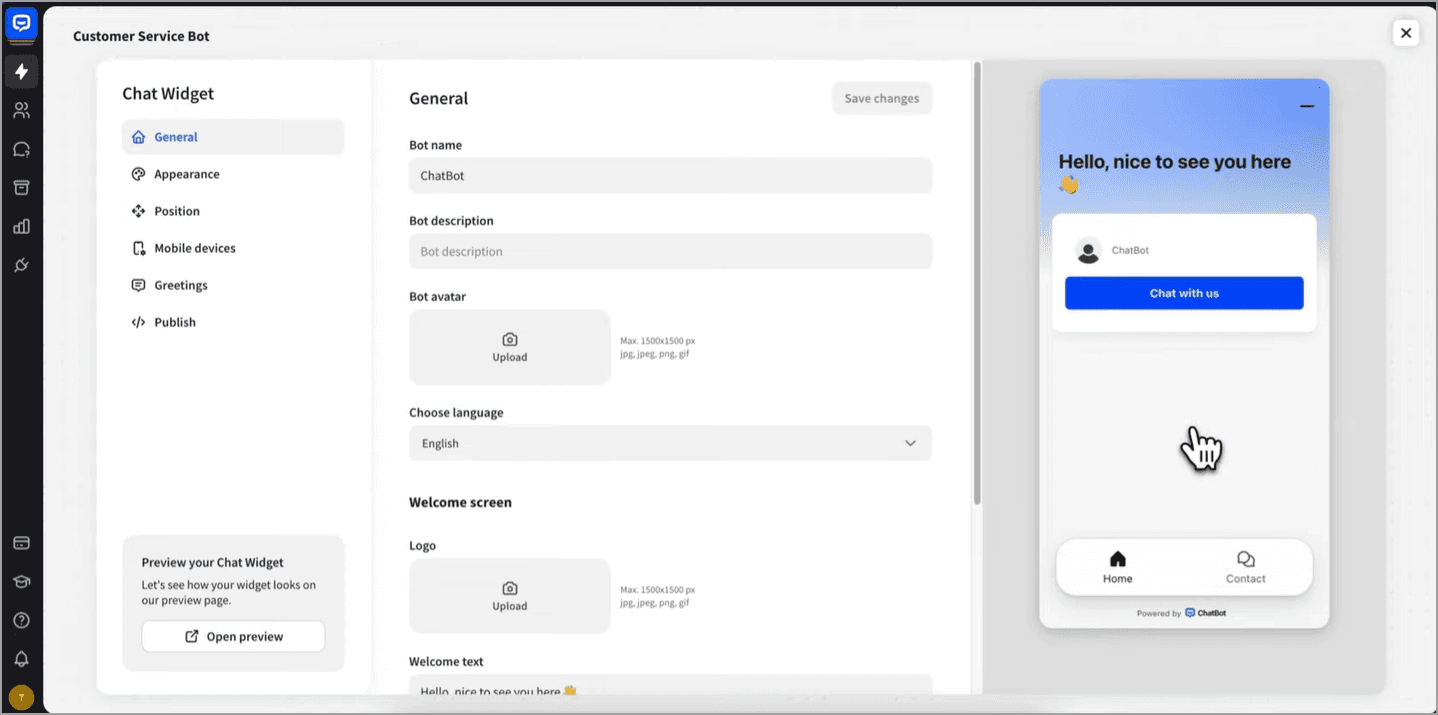
The visual bot builder is genuinely intuitive, with drag-and-drop flows, conditions, and integrations that do not require coding.
The AI Assist feature pulls from your website, help center, or uploaded knowledge sources to generate conversational responses. This means your bot isn't limited to rigid decision-tree paths and can handle complex things visitors throw at it.
Templates for ecommerce, lead generation, appointment booking, and customer support give you a running start instead of building from a blank canvas. The testing tool lets you simulate conversations before going live, which saves you from the embarrassment of a bot confidently giving wrong answers to real visitors.
Their AI is proprietary, which gives ChatBot more control over response consistency but limits the conversational flexibility you get from multi-LLM platforms like WotNot.
Capabilities:
Visual drag-and-drop chatbot builder
Proprietary AI with custom training
Pre-built templates for lead generation, support, and e-commerce
Website chat widget with customizable design
Integration with LiveChat for human handoff
Visitor tracking and engagement analytics
API for custom integrations
Where it stands out:
The bot builder is one of the most intuitive on the market for non-technical users
Proprietary AI means no third-party LLM dependency or per-token costs
Templates cover common use cases out of the box
The widget loads fast and looks native on most sites
The honest trade-off: ChatBot.com is primarily a web widget. Multi-channel deployment (WhatsApp, Messenger, SMS) is limited compared to platforms like WotNot or Freshchat. Human handoff requires a separate LiveChat subscription, which adds cost. The AI resolution limit on the Essential plan is tight, and the Growth plan at $79/month is where most teams will need to be for practical usage.
Best for: Teams that want AI chatbot automation on their website without committing to a full customer service platform. Works well as a lead generation widget or FAQ handler for small to mid-size websites.
Pricing:
Essential: $19/user/month (billed annually, 1 AI agent, shared inbox)
Growth: $79/month (200 AI agent resolutions, unlimited chat history)
Enterprise: Custom pricing (dedicated onboarding, SLAs, custom limits)
14-day free trial, no credit card required
8. Freshchat (Freshworks)
Rating: 4.4 (G2)
Freshchat is a messaging and chatbot platform within the Freshworks suite, positioned as the customer engagement component with Freshdesk for ticketing and Freshsales for CRM.
Freshchat occupies the middle ground between budget tools like Tawk.to and enterprise platforms like Intercom. It offers a free plan for up to 10 agents, includes a basic AI chatbot (Freddy), and integrates natively with the broader Freshworks ecosystem.
The AI capabilities through Freddy are functional but not as sophisticated as Intercom's Fin or WotNot's multi-LLM AI Studio. The bot handles intent detection, auto-resolution, and smart handoffs to human agents when conversations need a personal touch.
The widget itself supports rich messaging, so you can push images, carousels, quick-reply buttons, and even CSAT surveys directly inside the chat window.
Freddy sessions are billed separately, so the same cost-scaling concern that applies to Intercom applies here at a smaller scale.
Capabilities:
Live chat with visitor tracking and behavior-based triggers
Freddy AI chatbot for automated responses
Multichannel: web, WhatsApp, Facebook Messenger, Instagram, Apple Business Chat
Canned responses, FAQs, and auto-assign rules
IntelliAssign for smart conversation routing
Native integration with Freshdesk and Freshsales
Mobile apps for iOS and Android
Where it stands out:
Free plan includes up to 10 agents, which is the most generous free tier on this list
Native Freshworks integration means ticketing, CRM, and chat share one data model
IntelliAssign routes conversations based on agent skill and availability
Multichannel support includes WhatsApp and Apple Business Chat
The honest trade-off: Freshchat works best inside the Freshworks ecosystem. As a standalone tool, it lacks the depth of dedicated chat platforms. Freddy AI sessions are billed separately, and the pricing structure across Freshworks products can feel fragmented. Teams not already on Freshdesk or Freshsales may find the ecosystem lock-in more costly than the product warrants.
Best for: Mid-market teams already using Freshdesk or Freshsales that want a unified messaging layer. The free plan makes it a solid testing option for teams evaluating chat for the first time.
Pricing:
Free: Up to 10 agents, basic chat, and chatbot
Growth: $19/agent/month (billed annually)
Pro: $49/agent/month (billed annually)
Enterprise: $79/agent/month (billed annually)
Freddy AI sessions: billed separately ($100 to $1,000 per 1,000 sessions)
9. Zendesk Chat
Rating: 4.3 (G2)
Zendesk Chat (now part of the Zendesk Suite) is the chat widget component of Zendesk's enterprise customer service platform.
Zendesk is the default choice for large support operations with complex routing, SLA enforcement, and multi-brand requirements. The chat widget integrates deeply with Zendesk's ticketing, knowledge base, and analytics.
For teams already running their entire support infrastructure on Zendesk, adding the chat widget is a natural extension.
The AI layer comes through Zendesk AI agents, which charge $1.50 per automated resolution. The workflow automation can handle sophisticated routing based on priority, tags, groups, and skills.
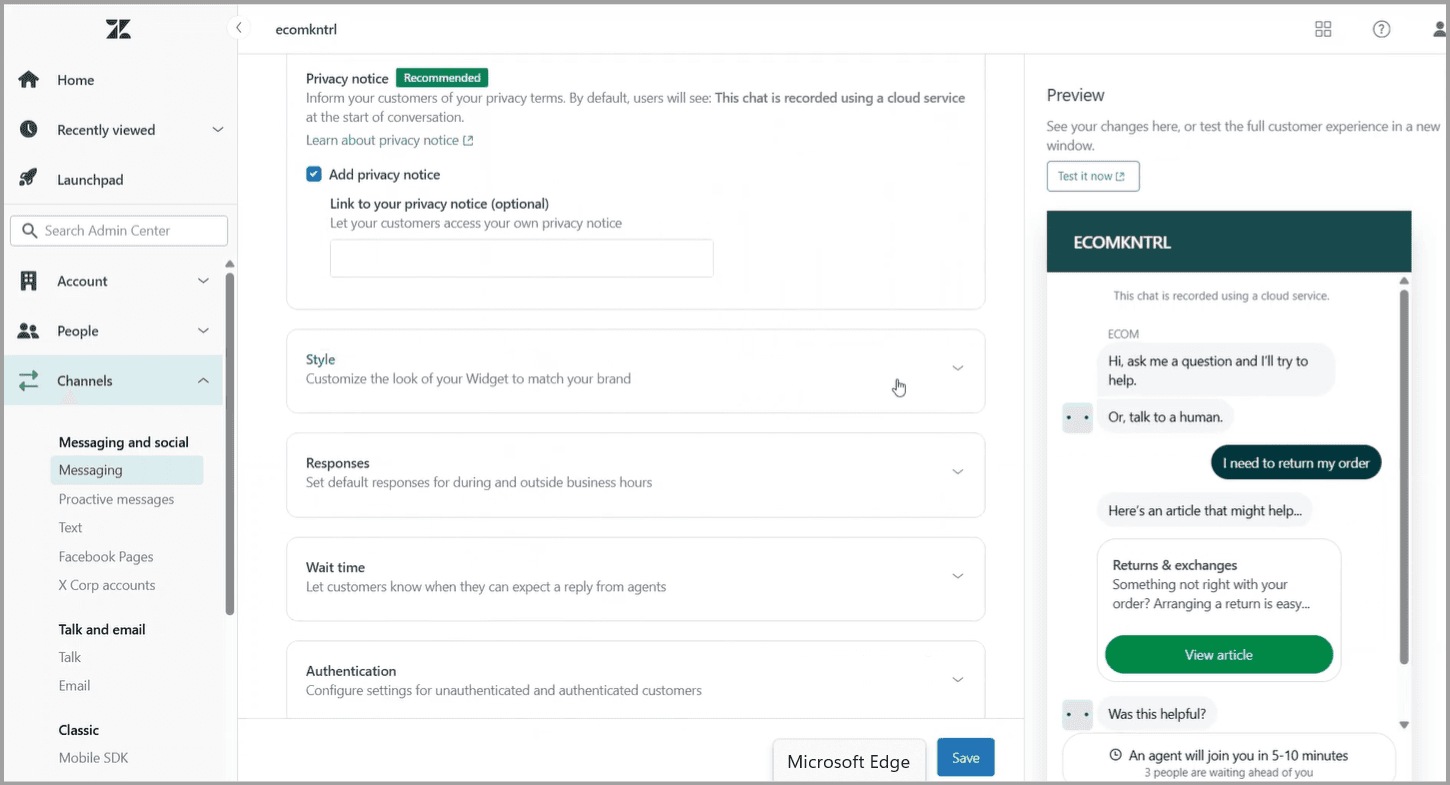
Bot building follows a visual flow builder approach with pre-built templates for common use cases like order tracking, returns, and appointment scheduling.
Capabilities:
Live chat integrated with Zendesk ticketing
AI agents for automated resolution ($1.50/resolution)
Advanced trigger-based routing and SLA management
Multi-brand support with separate widget configurations
Detailed analytics through Zendesk Explore
SDK for mobile app embedding
1,200+ integrations and marketplace apps
Where it stands out:
The deepest ticketing integration on this list, with conversations converting to tickets automatically
Multi-brand support allows separate widget designs and routing for each brand
SLA enforcement is built in, with automatic escalation for unresolved conversations
The analytics and reporting depth is enterprise-grade
The honest trade-off: Zendesk is expensive and complex. AI resolution fees add up at scale. Setup and configuration take significantly longer than simpler tools on this list, and the learning curve for administrators is steep. For small teams or straightforward chat needs, Zendesk is overkill.
Best for: Enterprise support teams with 20+ agents, multi-brand requirements, and complex SLA and routing needs. Not recommended for small businesses, startups, or teams looking for a quick chat widget deployment.
Pricing:
Support team: $19/agent/month (billed annually)
Suite Team: $55/agent/month (billed annually)
Suite Professional: $115/agent/month (billed annually)
Suite Enterprise: $169/agent/month (billed annually)
AI agents: $1.50/automated resolution
Copilot add-on: $50/agent/month
How to Add a Chat Widget to Your Website
Adding a chat widget to your website is one of the simplest technical tasks you will encounter. Most platforms follow the same process:
Sign up for the platform and configure your widget (design, greeting message, routing rules).
Copy the JavaScript snippet or embed code from your dashboard.
Paste the code into your website's HTML, typically in the
<head>or before the closing<body>tag.Publish your site. The widget appears.
If you use WordPress, Shopify, Wix, or Squarespace, most tools on this list offer a native plugin or app that skips the code-pasting step entirely. Installation takes under five minutes on most platforms.
The Right Chat Widget Is the One Your Team Actually Uses
The best chat widget is not the one with the longest feature list. It is the one your team adopts, your visitors engage with, and your business measures results from. I have watched teams deploy enterprise-grade platforms that their agents never log into, and I have watched single-person teams turn a simple AI widget into a lead generation machine.
Start with one channel. Measure response times, resolution rates, and conversion from chat to lead or sale. Then expand. If your widget is AI-powered, feed it your actual support content before going live, not after. The quality of the AI is only as good as the knowledge base behind it.
Start small. You will be surprised how far a well-configured chat widget can take you.
FAQs
FAQs
FAQs
What is the best free chat widget for a website?
What is the difference between a live chat widget and a chatbot widget?
Can I add a chat widget to my website without coding?
Which chat widget works best for e-commerce?
Can a chat widget work on WhatsApp and other messaging apps?
ABOUT AUTHOR

Bhavyadeep Sinh Rathod
Content Editor, WotNot
He likes technology, chatbots, comedy, philosophy, and sports. He often cracks hilarious jokes and lightens everyone's mood in the team.

Start building your chatbots today!
Curious to know how WotNot can help you? Let’s talk.
Start building your chatbots today!
Curious to know how WotNot can help you? Let’s talk.